
All Futures TP/SL is an account-level risk management tool designed to help you manage your overall Futures exposure more efficiently. It automatically closes all open Futures positions once your cumulative profit and loss (P&L) reaches a predefined Take Profit (TP) or Stop Loss (SL) target.
Unlike traditional position-based TP/SL settings, where TP and SL must be managed separately for each symbol or position, this feature allows you to set a single TP or SL threshold for your entire Futures portfolio. This makes it easier to manage portfolio-wide risk while providing an additional layer of protection beyond individual TP/SL settings.
This feature is especially useful for:
- Managing multiple positions or portfolios
- Reducing overnight exposure in global markets
- Navigating periods of high market volatility when reaction time may be limited
Supported Products, Modes, and Accounts
All Futures TP/SL supports the following products and modes:
Note: All Futures TP/SL does not apply to Spot, Spot Margin, or Options trading, and is not supported in Portfolio Margin mode.
How It Works
All Futures TP/SL tracks the cumulative P&L across all Futures positions from the moment the feature is enabled, including:
- Positions that were already open when the feature was enabled
- New positions opened after the feature was enabled
- Positions closed during the strategy lifecycle
Cumulative P&L includes both realized and unrealized P&L from all tracked Futures positions, as well as trading fees and funding fees.
Your cumulative P&L is updated continuously based on trading activity and market movements. Once the cumulative P&L reaches either the configured TP or SL target, the corresponding TP or SL will be triggered, and all open Futures positions will be closed using market orders. The strategy will then end, completing one TP/SL lifecycle.
To use the All Futures TP/SL feature again, you'll need to configure and enable it again manually.
Examples
The following examples demonstrate how cumulative P&L is calculated and how the All Futures TP/SL feature behaves under different trading scenarios.
Initial setup
Assume the trader currently holds the following Futures positions:
With the current Futures portfolio profit at $170, the trader sets the following thresholds to target a total profit of $300 while limiting potential losses to -$100.
- Take Profit (TP): $300
- Stop Loss (SL): -$100
Scenario 1: Market movement
The market moves in the trader's favor, increasing the unrealized P&L of the existing positions.
- As a result, the total cumulative P&L increases from $170 to $210.
- Since the TP threshold of $300 has not been reached, no TP or SL action is triggered, and all positions remain open.
Scenario 2: Opening a new position
The trader opens a new BTCUSDT-26JUN26 Perpetual position.
- When the order is executed, a trading fee of -$10 is charged and immediately reflected in realized P&L. This reduces the total cumulative P&L from $210 to $200.
- Because the cumulative P&L remains within the configured TP/SL range, no action is taken.
Scenario 3: Funding fee settlement
Funding fees are applied to the Perpetual positions.
- The funding fees are reflected in realized P&L, updating the total cumulative P&L from $200 to $235.
- Since the TP and SL thresholds are still not reached, all positions remain open.
Scenario 4: Position liquidation
The ETHUSD Perpetual position is liquidated, converting its unrealized P&L into realized P&L
- Although the unrealized and realized P&L values change, the total cumulative P&L remains unchanged at $235.
- As the cumulative P&L still does not reach either threshold, no TP or SL action is triggered.
Scenario 5: Placing a limit order
The trader places a new ETHUSD Perpetual limit order.
- Since the limit order remains unfilled, no realized or unrealized P&L is generated.
- As a result, the total cumulative P&L remains unchanged, and no TP or SL action is triggered.
Scenario 6: Closing a position and applying trading fees
The ETHUSD Perpetual limit order is filled, and the trader closes the BTCUSDT Perpetual position.
- The unrealized P&L of BTCUSDT Perp is converted into realized P&L when the position is closed. A closing fee of -$5 is also charged.
- At the same time, trading fees from the filled ETHUSD limit order are reflected in realized P&L.
- Although the total cumulative P&L is updated, it still does not reach either the TP or SL threshold, so no action is taken.
Scenario 7: All Futures TP/SL triggered
The market moves again.
- The unrealized P&L of BTCUSDT-26JUN26 increases to $100, bringing the total cumulative P&L to $325, which exceeds the TP threshold of $300.
- As a result, All Futures TP/SL is triggered and all open Futures positions are closed using market orders.
How to Set Up and Manage All Futures TP/SL
To use the All Futures TP/SL feature, your account must have at least two open Futures positions. Follow the steps below to set up and manage the feature.
Step 1: Go to the Futures trading page, scroll down to the Positions tab at the bottom of the screen, and you will find All Futures Positions.

Step 2: Click Set TP/SL in the top-right corner and configure your TP and SL targets.
- Take Profit (TP): Automatically closes all Futures positions when your cumulative P&L reaches the specified target.
- Stop Loss (SL): Automatically closes all Futures positions when your cumulative P&L falls to the specified target
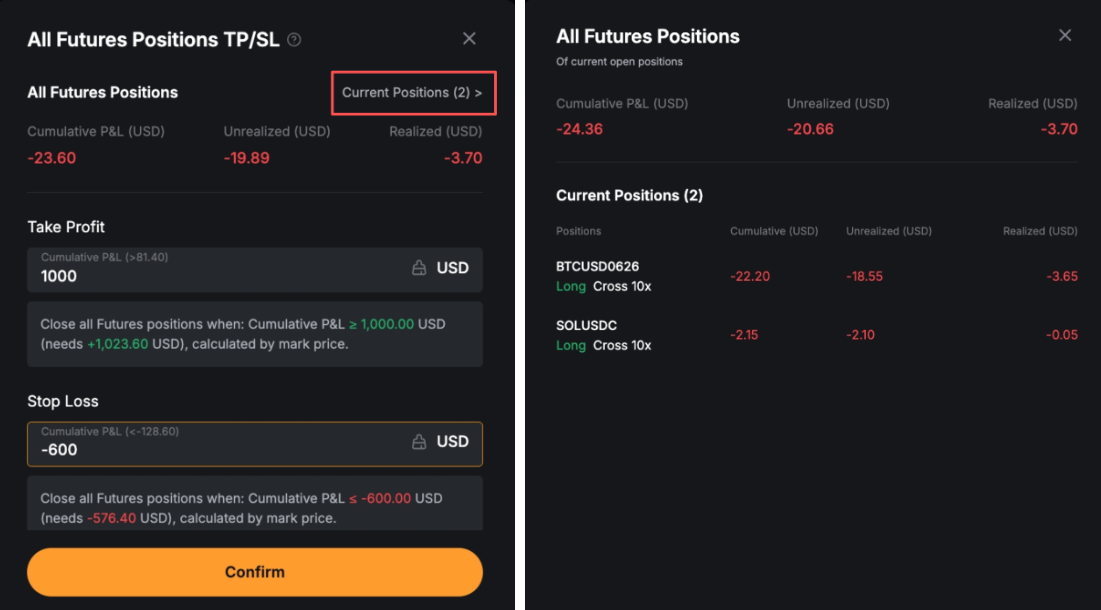
To view the P&L breakdown of your current positions, click Current Positions in the top-right corner of the window.
Note: If All Futures TP/SL and liquidation are triggered simultaneously, liquidation will take priority. To reduce the likelihood of liquidation occurring first, avoid setting the SL target too close to the liquidation level. For more information on how liquidation works under the UTA, please refer to this article.
Step 3: Once the thresholds are configured, click Confirm. A confirmation message will appear, and your cumulative P&L and strategy setup time will be displayed.
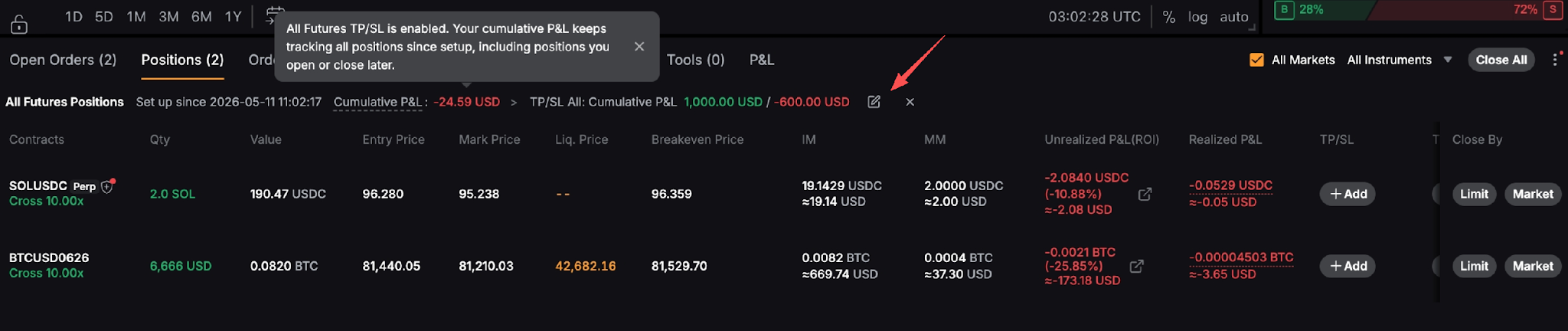
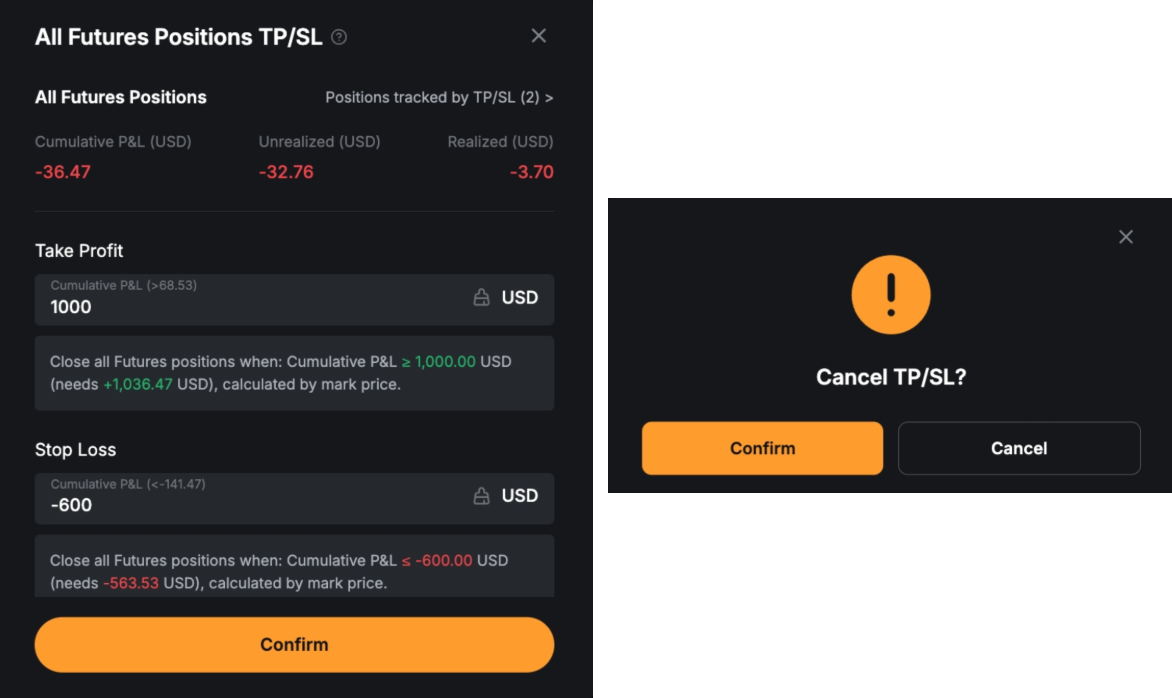
You can click the Edit icon next to the cumulative P&L to update your settings, or cancel the TP/SL strategy by clicking the Remove icon.
To view your All Futures TP/SL history, go to the P&L tab and select All Futures TP/SL. Click Details to view more detailed strategy information, including the closed P&L, duration, trading fees, and funding fees.

Notes:
— Cumulative P&L is calculated based on the mark price and displayed in USD. For more details on P&L, please refer to this article.
— The final closed P&L may differ from the predefined target due to closing fees, slippage, and market liquidity during execution.