
The Cooling-off Period is a risk management feature that you can activate to temporarily suspend Futures trading. It allows you to step away, reassess your strategy and avoid impulsive or emotionally driven decisions.
Once the Cooling-off Period is activated, you may only:
- Reduce or close positions from the Positions tab
- Adjust margin and leverage
During this period, you will not be able to:
- Open new positions
- Increase existing positions
- Execute pending orders, except TP/SL, Trailing Stop and MMR Close
The Cooling-off Period only applies to the products listed below.
Here is a guide on how to use the Cooling-off Period for your trading account.
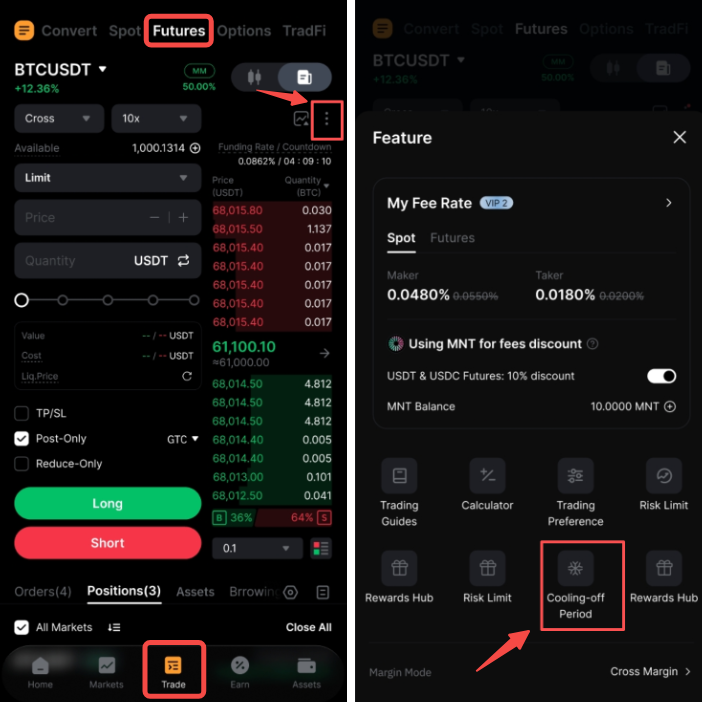
Step 1: On the Bybit App, go to Trade → Futures, tap the three-dot icon in the top-right corner and select Cooling-off Period.
Step 2: On the Cooling-off Period page, choose one of the following activation methods:
a) Manual Trigger: Manually activate the Cooling-off Period and select a duration:
- 1 day: Takes effect immediately and ends at 12AM the next day (D+1).
- 3 days: Takes effect immediately and ends at 12AM on D+3. The same rule applies to the other durations.
- To use it again, you will need to set a new Manual Trigger.
Example: If enabled on Mar 3 at 3PM UTC, the feature will activate immediately and remain active until Mar 4 at 12AM UTC for the 1-day duration, or until Mar 6 at 12AM UTC for the 3-day duration.
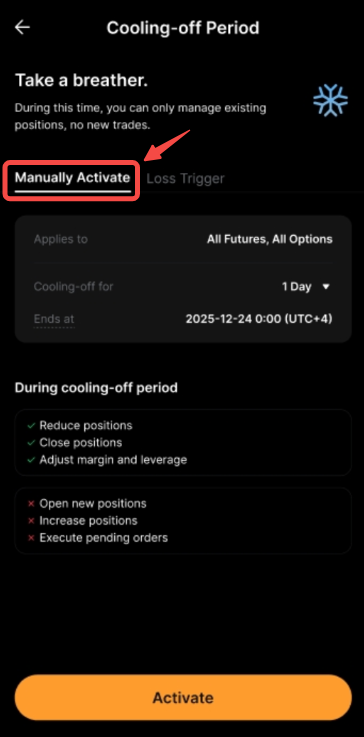
Note: The end time will be automatically displayed once you select a duration.
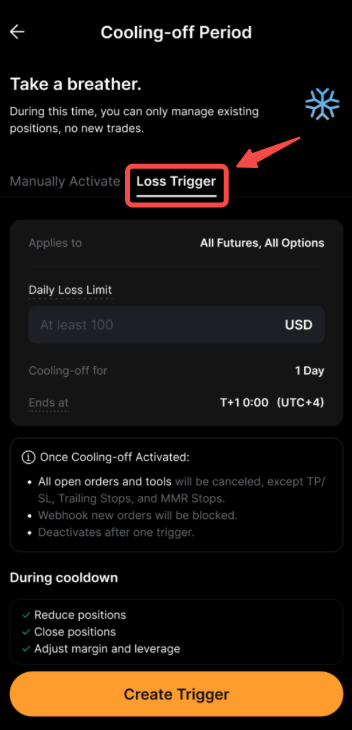
b) Loss Trigger: Set a daily loss limit to automatically trigger the Cooling-off Period when your daily P&L reaches that limit.
- Daily P&L formula: Daily P&L = Realized P&L + Unrealized P&L.
- Daily P&L will be calculated in USD across all Futures positions.
- Daily P&L starts accumulating from 0 once the Loss Trigger is set and resets daily at 12AM.
- Once activated, the Cooling-off Period remains active until 12AM the next day, after which it automatically deactivates. To use it again, you will need to set a new Loss Trigger.
- To enable the Loss Trigger, you must set a daily loss limit of at least $100.
Example: Assume you set a daily loss limit of $1,000 at 8AM UTC on Mar 15, 2026, and then make several trades:
At 3PM, your daily P&L reaches -$1,100, exceeding the daily loss limit of $1,000. As a result, the Cooling-off Period is triggered. The Cooling-off Period will remain active until 12AM UTC on Mar 16, 2026, after which it will automatically deactivate. To use this feature again, you will need to set a new Loss Trigger.
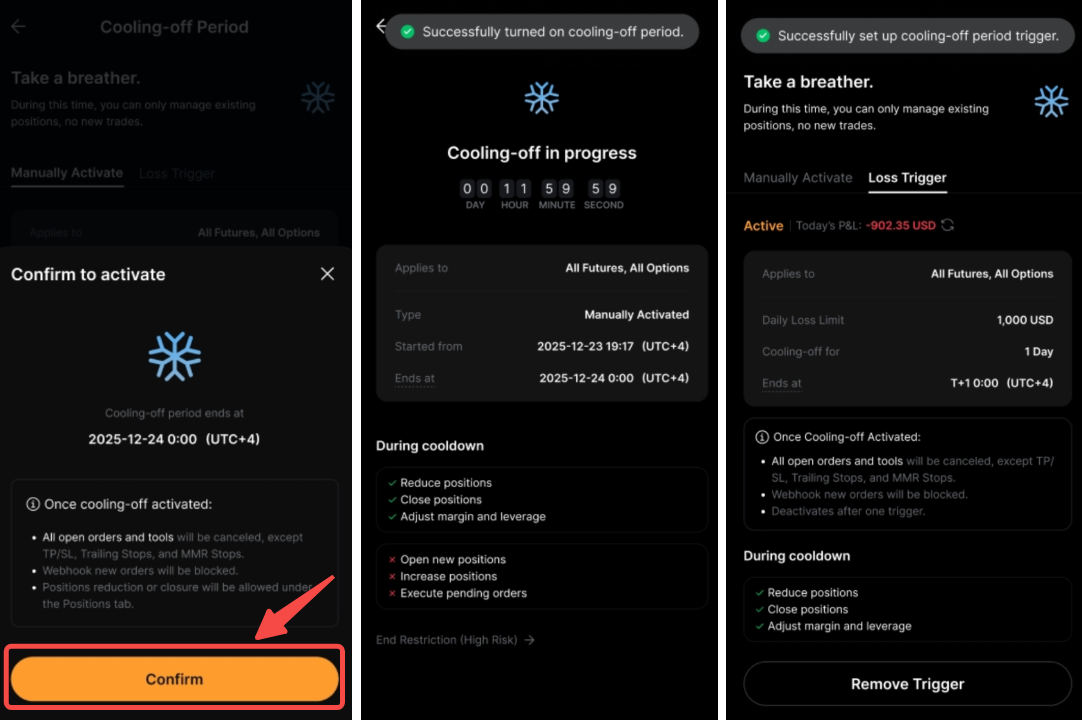
Step 3: In the confirmation pop-up, review the details and confirm the activation. A message will appear once the feature has been successfully activated.
Notes:
— The Cooling-off Period follows your local time zone. Restrictions are automatically lifted at 12AM on the end date.
— The Cooling-off Period is activated at the account level. Enabling it on your Main Account does not automatically apply it to your Subaccounts.
— Once the Cooling-off Period is triggered, all open orders and trading tools will be canceled, except those that help reduce risk, such as TP/SL, Trailing Stop and MMR Close.