
Apa itu Bybit Pay Later?
Bybit Pay Later adalah layanan keuangan yang tersedia di Kartu Bybit atau Bybit Pay yang menyediakan likuiditas koin stabil untuk membantu memenuhi kebutuhan pengeluaran Anda. Layanan ini memungkinkan Anda untuk mengakses likuiditas dengan meminjam berdasarkan aset kripto yang Anda miliki tanpa harus menjualnya.
Anda dapat menggunakan aset kripto Anda sebagai jaminan dan membayar bunga sebagai ganti USDT untuk membayar pembelian Anda. Hal ini memungkinkan Anda untuk membagi pembelian besar menjadi cicilan bulanan — ideal jika Anda lebih suka menahan kripto Anda dalam jangka panjang atau berharap nilainya meningkat.
Mengapa saya harus menggunakan Bybit Pay Later?
Bybit Pay Later memungkinkan Anda mengakses likuiditas sekaligus memiliki kripto, menawarkan fleksibilitas dan kontrol atas cara Anda membayar.
- Lindungi kepemilikan Anda: Gunakan nilai kripto Anda tanpa menjual, sehingga Anda dapat terus mendapatkan keuntungan dari potensi pertumbuhan pasar.
- Lunasi sesuai kemampuan Anda: Pilih opsi cicilan 1, 2, 3, atau 6 bulan sesuai preferensi.
- Nikmati kepastian biaya: Lakukan pelunasan bulanan terprediksi dengan bunga tetap, yang dikunci saat konfirmasi opsi cicilan.
- Dapatkan lebih banyak cashback: Dapatkan hadiah cashback yang lebih tinggi dibandingkan dengan opsi pembayaran langsung.
Siapa yang memenuhi syarat untuk menggunakan Bybit Pay Later?
Bybit Pay Later tersedia bagi pengguna yang telah menyelesaikan setidaknya Verifikasi Identitas Standar di Bybit Global dan memenuhi syarat untuk menggunakan Kartu Bybit atau Bybit Pay, tidak termasuk pemegang kartu di WEE dan Swiss. Pengguna dengan Verifikasi Identitas Bisnis tidak memenuhi syarat untuk layanan ini. Untuk informasi selengkapnya cara menyelesaikan Verifikasi Identitas Individual, silakan lihat artikel ini.
Dapatkah saya menggunakan Bybit Pay Later di situs web Bybit dan Aplikasi Bybit?
Tidak. Saat ini Bybit Pay Later hanya tersedia di Aplikasi Bybit.
Bagaimana cara kerja Pay Later di Kartu Bybit?
Pay Later saat ini menggunakan model cicilan pasca pembelian di Kartu Bybit. Ini berarti Anda akan menyelesaikan pembelian terlebih dahulu menggunakan dana Anda sendiri dan kemudian memiliki opsi untuk mengonversi transaksi tersebut menjadi cicilan bulanan setelahnya. Setelah konversi dilakukan, jumlah pinjaman yang sesuai akan dikreditkan ke Akun Pendanaan Anda.
Contoh:
Misalkan Pengguna A melakukan pembelian senilai $2.000 dan menggunakan 2.028 USDT untuk membayar transaksi. Setelah pembayaran, Pengguna A memutuskan untuk mengonversi pembelian menjadi opsi cicilan 3 bulan untuk likuiditas tambahan. Sistem akan menghitung jumlah pinjaman USDT berdasarkan nilai tukar USD-ke-USDT setelah konfirmasi pesanan cicilan ($2.000 ÷ nilai tukar) dan mengkreditkan USDT yang setara ke Akun Pendanaan Pengguna A. Pengguna A kemudian dapat melunasi modal dan bunga yang terakumulasi dalam 3 bulan.
Aset apa saja yang didukung di Bybit Pay Later?
Aset jaminan: Bybit Pay Later mendukung aset jaminan yang sama dengan Pinjaman Kripto, kecuali stablecoin seperti USDT dan USDC.
Aset pinjaman: Saat ini, hanya USDT yang tersedia sebagai aset pinjaman. Sistem secara otomatis mengonversi jumlah fiat yang Anda keluarkan menjadi USDT berdasarkan nilai tukar yang berlaku dan meminjamkan jumlah yang sama ke Anda. Mata uang lain dapat ditambahkan di masa mendatang — nantikan pembaruannya.
Apakah pelunasan bulanan saya sama dalam opsi cicilan?
Ya. Bybit Pay Later menggunakan struktur pelunasan modal dan bunga yang sama, yang berarti Anda akan melunasi jumlah yang sama setiap bulannya. Namun, jumlah modal dan bunga dalam setiap pelunasan bervariasi. Untuk informasi selengkapnya, lihat di sini.
Durasi cicilan apa yang dapat saya pilih?
Anda dapat memilih opsi cicilan mulai dari 1, 2, 3, atau 6 bulan.
Bagaimana cara menggunakan Bybit Pay Later di Kartu Bybit?
Tidak perlu mengaktifkan Bybit Pay Later secara terpisah. Anda dapat membagi pembelian menjadi cicilan bulanan dengan mengikuti langkah-langkah berikut:
Langkah 1: Lakukan pembelian menggunakan Kartu Bybit Anda, dan bayar dengan aset Anda sendiri terlebih dahulu.
Langkah 2: Akses opsi Konversi ke Cicilan melalui salah satu metode berikut:
- Dari laman Bybit Pay, pilih Konversi ke Cicilan.
- Ketuk notifikasi push yang Anda terima setelah pembelian untuk langsung menuju ke laman konfirmasi cicilan.
- Dari laman riwayat transaksi Kartu Bybit, centang kotak Memenuhi Syarat untuk cicilan pada Otorisasi, atau pilih transaksi dengan ikon kartu.
Langkah 3: Pilih opsi cicilan yang Anda inginkan, lalu ketuk Konfirmasi.
Langkah 4: Lunasi tepat waktu setelah laporan bulanan Anda telah dibuat.
Untuk mendapatkan instruksi selengkapnya, silakan lihat Cara Memulai Pay Later di Kartu Bybit.
Dapatkah saya memilih cicilan untuk semua pembelian Kartu Bybit saya?
Tidak. Agar memenuhi syarat untuk cicilan, transaksi Kartu Bybit harus memenuhi ketentuan berikut:
Transaksi terbaru yang memenuhi syarat akan muncul di bagian Konversi ke Cicilan di laman Bybit Pay Later. Anda juga dapat mengetuk Lihat semua yang tersedia untuk melihat selengkapnya transaksi yang memenuhi syarat dalam riwayat transaksi Anda.
Bagaimana jumlah pinjaman maksimum saya di Bybit Pay Later ditentukan?
Bybit Pay Later menetapkan batas kredit pengeluaran total untuk setiap pengguna, yaitu jumlah maksimum yang dapat Anda pinjam dan digunakan bersama untuk Kartu Bybit maupun Bybit Pay.
Jumlah ini dihitung berdasarkan nilai USD dari 20 aset kripto teratas yang disimpan di Akun Pendanaan Anda dan akun jaminan Pay Later. Setiap nilai aset dihitung sesuai dengan rasio nilai jaminannya. Untuk informasi selengkapnya tentang rasio jaminan tertentu berdasarkan aset, silakan lihat laman ini.
Kredit Pengeluaran Anda yang tersedia adalah jumlah yang saat ini dapat Anda pinjam, dihitung sebagai total kredit pengeluaran Anda dikurangi cicilan yang belum lunas.
Berapa jumlah cicilan maksimum dan minimum untuk Pay Later di Kartu Bybit?
- Jumlah cicilan maksimum sama dengan total kredit pengeluaran Anda.
- Jumlah cicilan minimum adalah $200.
Dapatkah saya mengatur pengingat cicilan untuk mengetahui apakah pembelian Kartu saya memenuhi syarat untuk cicilan?
Ya. Notifikasi push tersedia untuk transaksi Kartu Bybit. Anda dapat menetapkan jumlah transaksi minimum untuk memicu notifikasi ini. Ambang batas bawaan adalah $200.
Sebagai contoh, jika Anda menetapkan ambang batas pengingat menjadi $500, Anda akan menerima notifikasi setiap kali Anda melakukan transaksi sebesar $500 atau lebih.
Harap dicatat bahwa Anda tidak akan menerima pengingat untuk transaksi di bawah ambang batas yang Anda tetapkan, tetapi Anda masih dapat mengkonversi transaksi tersebut menjadi cicilan dari halaman utama Pay Later atau riwayat transaksi Anda. Anda juga dapat menonaktifkan pengingat kapan saja sesuai kebutuhan.
Bagaimana cara melihat dan melunasi cicilan bulanan saya?
Laporan cicilan bulanan Anda akan tersedia pada hari pertama setiap bulan. Pembuatan dimulai pada pukul 07.00 WIB dan mungkin memerlukan waktu beberapa jam untuk diselesaikan. Anda akan menerima notifikasi push aplikasi dan pengingat email saat laporan Anda siap. Laporan ini mencakup total jumlah jatuh tempo dan rincian transaksi Anda.
Setelah Anda menerima laporan, ketuk Lunasi untuk melunasi jumlah jatuh tempo paling lambat tanggal 8 setiap bulannya.
Berapa rasio Pinjaman terhadap Nilai Awal (LTV) untuk Bybit Pay Later?
Bybit Pay Later menggunakan rasio Pinjaman terhadap Nilai Awal (LTV) berikut:
- LTV Awal: 80%
- LTV Margin Call: 85%
- LTV Likuidasi: 95%
Rasio LTV dihitung dalam mode Margin Silang dengan membagi total jumlah pinjaman Anda di semua pesanan Pay Later dengan total nilai jaminan. Pesanan yang dibuat melalui Kartu Bybit dan Bybit Pay digabungkan dan dihitung secara keseluruhan. Untuk informasi selengkapnya tentang cara kerja LTV, silakan lihat artikel ini.
Harap diperhatikan bahwa jaminan yang digunakan untuk Bybit Pay Later dikelola secara terpisah dari Pinjaman Kripto dan tidak dapat digunakan bersama untuk kedua layanan.
Bagaimana cara kerja jaminan di Bybit Pay Later?
Ketika Anda menggunakan Bybit Pay Later untuk transaksi Kartu Bybit, sistem secara otomatis memilih aset kripto dari Akun Pendanaan Anda sebagai jaminan, dimulai dengan aset yang memiliki nilai USD tertinggi. Harap dicatat bahwa stablecoin tidak dapat digunakan sebagai jaminan.
Jumlah yang diperlukan kemudian ditransfer ke akun jaminan Anda. Anda dapat menambah atau mengurangi jaminan dari dasbor Bybit Pay Later Anda kapan saja setelah pembelian. Rincian lebih lanjut tentang penyesuaian jaminan dapat ditemukan di sini.
Jika Anda menambahkan lebih banyak jaminan di kemudian hari dan melakukan pembelian lain, sistem akan memeriksa terlebih dahulu apakah akun jaminan Anda memiliki dana yang cukup. Jika jaminan mencukupi dan rasio LTV Anda setelah pembelian tidak melebihi ambang batas awal sebesar 80%, sistem akan langsung menggunakan jaminan yang tersedia.
Jika jaminan tidak mencukupi, sistem akan secara otomatis memilih aset kripto tambahan dari Akun Pendanaan Anda dalam urutan menurun berdasarkan nilai USD hingga jumlah jaminan yang dibutuhkan terpenuhi. Jika Akun Pendanaan Anda tidak memiliki aset yang cukup untuk menutupi jaminan, opsi cicilan tidak akan tersedia.
Akun apa yang dapat saya gunakan untuk menyediakan jaminan untuk Bybit Pay Later?
Setelah pesanan Pay Later Anda dikonfirmasi, jaminan yang diperlukan akan secara otomatis ditransfer dari Akun Pendanaan Anda ke akun jaminan Bybit Pay Later Anda.
Bagaimana cara menyesuaikan jaminan saya setelah membuat pesanan Pay Later?
Anda dapat menyesuaikan jaminan kapan saja dari dasbor Bybit Pay Later. Ketuk Status LTV untuk membuka laman Jaminan, di mana Anda dapat menambahkan atau mengurangi jaminan sesuai kebutuhan. Untuk informasi selengkapnya, lihat artikel ini.
Dapatkah saya melunasi lebih awal?
Pelunasan lebih awal tidak tersedia sebelum laporan bulanan dibuat. Setelah laporan bulanan Anda siap pada hari pertama setiap bulan, Anda memiliki waktu hingga tanggal 8 untuk menyelesaikan Pelunasan. Suku bunga dihitung dengan tarif tetap secara bulanan, sehingga total jumlah bunga tetap sama terlepas dari kapan Anda melunasi selama periode ini.
Pastikan untuk melakukan Pelunasan sebelum tanggal jatuh tempo — jika tidak, Suku bunga penalti sebesar tiga kali lipat dari tarif reguler akan dikenakan.
Apakah pelunasan parsial didukung?
Ya, Pelunasan sebagian didukung secara bulanan. Setelah laporan bulanan Anda tersedia, Anda dapat memilih untuk melunasi jumlah jatuh tempo bulanan Anda baik secara penuh maupun sebagian. Cukup ketuk Edit jumlah di jendela Pelunasan dan masukkan jumlah Pelunasan yang Anda inginkan. Namun, pastikan semua kewajiban dilunasi paling lambat tanggal 8 setiap bulan untuk menghindari Suku bunga penalti atau likuidasi.
Sebagai contoh, jika jumlah jatuh tempo bulan Oktober Anda adalah 5.000 USDT, Anda dapat melakukan Pelunasan sebesar 1.000 USDT pada 3 Okt, 1.500 USDT pada 5 Okt, dan sisanya 2.500 USDT pada 8 Okt.
Harap dicatat bahwa hanya USDT dari Akun Pendanaan Anda yang dapat digunakan untuk Pelunasan. Jumlah yang menunggak tidak akan dibawa ke bulan berikutnya — karena likuidasi akan dipicu jika pembayaran tidak diselesaikan dalam masa tenggang 72 jam.
Dapatkah saya melunasi cicilan menggunakan aset yang berbeda dari aset yang saya pinjam?
Tidak. Semua pelunasan Pay Later harus dilakukan dengan aset yang sama dengan yang Anda pinjam, yaitu USDT.
Apa yang terjadi jika pembelian saya yang dilakukan dengan Bybit Pay Later dibatalkan atau dikembalikan?
Setelah opsi cicilan Pay Later dikonfirmasi, jumlah pinjaman akan dirilis ke Akun Pendanaan Anda, dan cicilan tidak dapat diubah atau dibatalkan. Jika pembelian awal Kartu Bybit Anda tidak berhasil, Anda akan menerima notifikasi yang meminta Anda untuk mencoba kembali pembayaran menggunakan Pay Now (Bayar Sekarang) untuk menyelesaikan pembelian.
Namun, meskipun pembelian Anda pada akhirnya dibatalkan atau dikembalikan, pesanan cicilan Anda akan tetap aktif, dan Anda masih harus melakukan pelunasan yang diperlukan sesuai dengan laporan bulanan Anda.
Mengapa saya tidak menerima jaminan saya setelah melakukan pelunasan?
Jika Anda memiliki lebih dari satu pesanan Pay Later, jaminan Anda hanya akan dikembalikan setelah semua pesanan dilunasi sepenuhnya. Ini karena Bybit Pay Later beroperasi dalam mode Margin Silang, di mana jaminan Anda digunakan bersama di semua pesanan untuk membantu mengurangi risiko likuidasi.
Jika diperlukan, Anda dapat memilih untuk mengurangi jaminan Anda — hingga jumlah yang akan membawa rasio LTV Anda kembali ke tingkat awal 80%.
Setelah semua cicilan Anda dilunasi sepenuhnya, sisa jaminan akan secara otomatis ditransfer dari akun jaminan Anda kembali ke Akun Pendanaan Anda.
Bagaimana jika saya menggunakan bonus untuk pembelian Pay Later?
Jumlah pinjaman Pay Later Anda akan didasarkan pada jumlah aktual yang Anda bayar — yaitu, total pembelian dikurangi bonus yang diterapkan. Sebagai contoh, jika Anda melakukan pembelian senilai $100 dan menggunakan bonus $5, jumlah pinjaman Anda akan didasarkan pada $95 ($100 − $5).
Bagaimana cara menghitung jumlah jatuh tempo dalam laporan bulanan saya?
Laporan bulanan Anda mencakup pokok dan bunga yang terakumulasi selama siklus penagihan sebelumnya. Sebagai contoh, laporan yang dibuat pada 1 Oktober akan mencakup semua cicilan untuk transaksi yang dilakukan pada bulan September.
Saya tidak menggunakan Pay Later di Kartu Bybit. Mengapa saya masih melihat jumlah yang belum lunas di dasbor?
Total saldo yang belum lunas dan batas tersedia yang ditampilkan di dasbor Anda digunakan bersama di semua transaksi Pay Later, baik yang dilakukan melalui Kartu Bybit maupun Bybit Pay. Ini berarti bahwa meskipun Anda hanya menggunakan Pay Later dengan Bybit Pay (dan tidak dengan Kartu Bybit Anda), saldo yang belum lunas akan tetap muncul di dasbor Kartu Bybit — dan sebaliknya.
Apakah terdapat risiko terkait dengan Bybit Pay Later?
Ya. Bybit Pay Later adalah layanan keuangan dengan jaminan berlebih dan memiliki risiko-risiko sebagai berikut:
- Risiko likuidasi: Jika rasio Pinjaman terhadap Nilai Awal (LTV) Anda mencapai atau melebihi LTV Likuidasi, aset jaminan Anda akan dilikuidasi untuk melunasi jumlah pinjaman dan bunga terakumulasi. Biaya likuidasi sebesar 2% juga akan dikenakan. Untuk informasi selengkapnya, lihat artikel ini.
- Bunga keterlambatan: Jika Anda gagal melakukan pelunasan pada tanggal jatuh tempo, suku bunga penalti setara dengan tiga kali suku bunga reguler akan berlaku dalam masa tenggang 72 jam. Setelah periode ini, likuidasi akan dilakukan.
Bagaimana cara mengetahui jika cicilan saya sudah jatuh tempo?
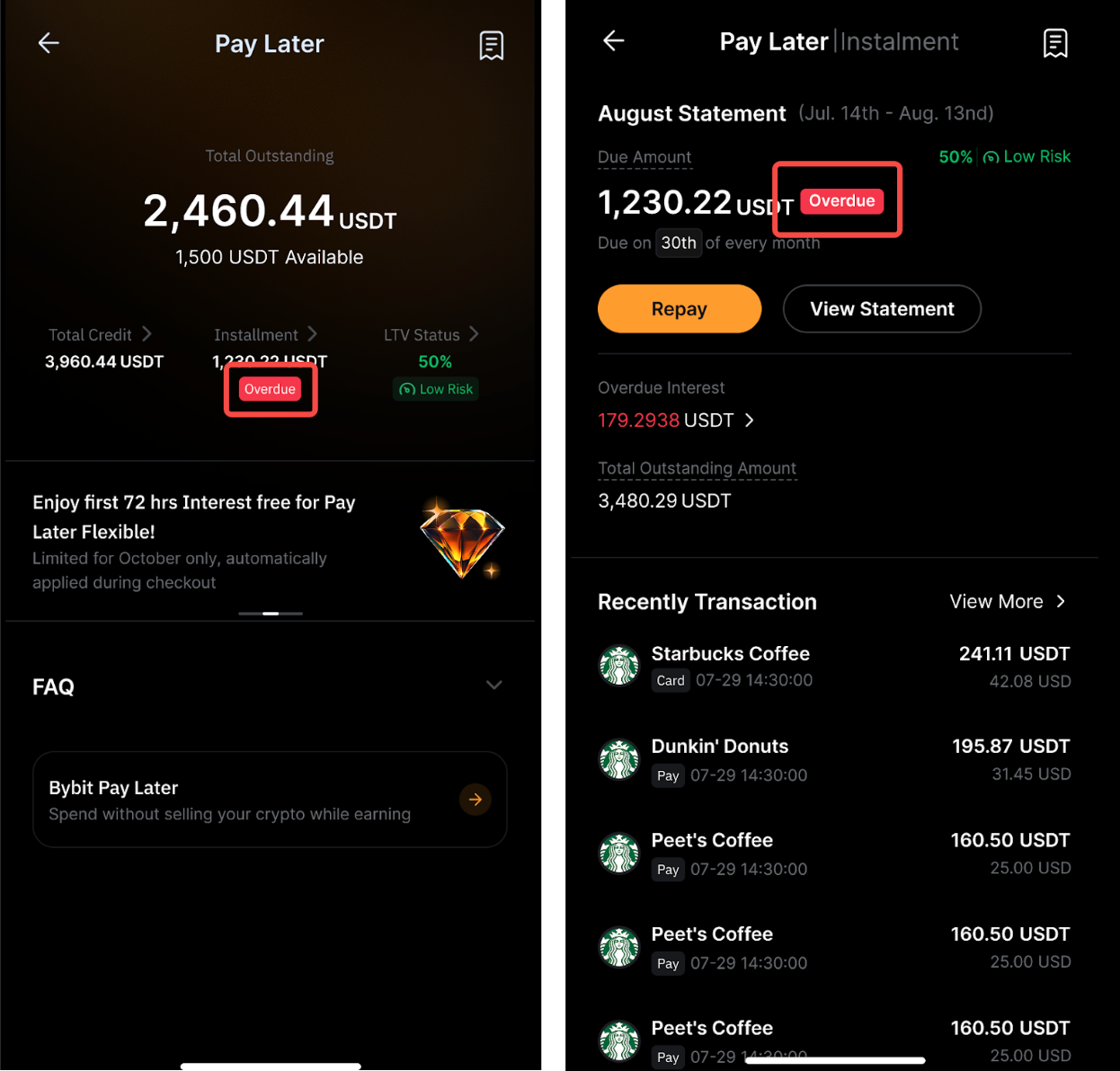
Anda akan melihat label Jatuh Tempo pada halaman Bybit Pay Later dan halaman Pernyataan.
Di mana saya dapat memeriksa informasi jatuh tempo saya?
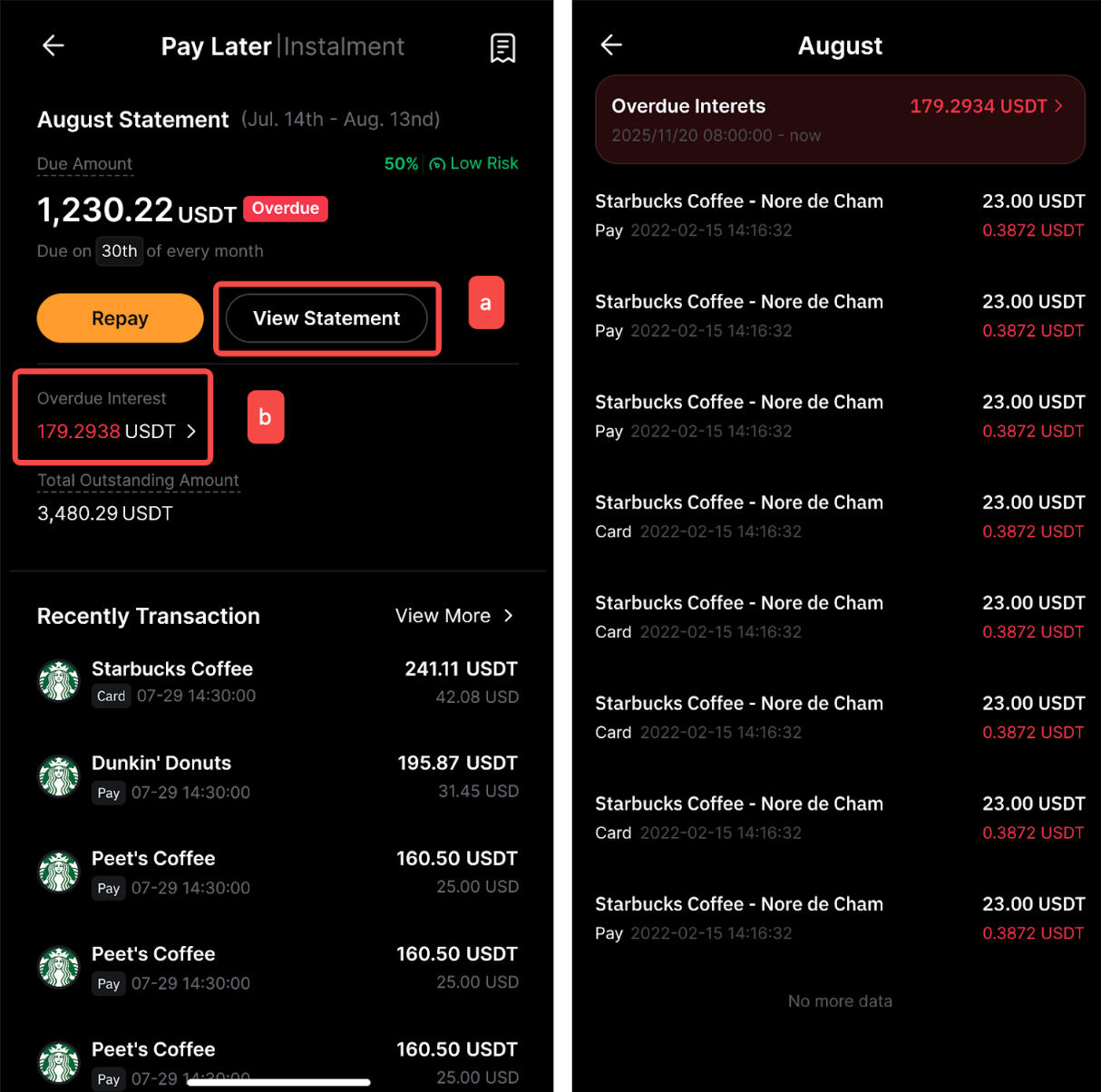
Dengan mengetuk Cicilan pada halaman Bybit Pay Later → (a) Lihat Pernyataan atau (b) Bunga Jatuh Tempo, Anda dapat melihat bunga jatuh tempo dan setiap rinciannya.
Dapatkah saya memperoleh cashback dari transaksi Pay Later?
Ya. Selain cashback yang Anda peroleh dari Program Hadiah saat berbelanja dengan Kartu Bybit, Anda dapat menerima cashback tambahan jika Anda memilih untuk membayar dengan cicilan Pay Later. Untuk detail selengkapnya, lihat artikel ini.