
LP CLMM adalah fitur di Bybit Alpha yang memungkinkan penyedia likuiditas (LP) untuk berpartisipasi dalam pool Market Maker Likuiditas Terkonsentrasi (CLMM) dan mengalokasikan modal mereka dalam rentang harga tertentu. Pendekatan ini menawarkan efisiensi modal dan potensi penghasilan yang lebih besar dibandingkan dengan penyediaan likuiditas tradisional. Pool likuiditas bersumber dari platform terkemuka seperti Byreal, Raydium, dan Orca, dan menghasilkan imbal hasil yang lebih tinggi dari biaya trading di pool tersebut.
Fitur Utama dan Pengalaman Pengguna
- Penebusan dan hadiah: Saat pengguna menebus investasi, mereka akan menerima modal awal beserta hadiah yang diperoleh, termasuk biaya trading dan token insentif.
- Mata Uang yang didukung: Bybit Alpha mendukung berbagai mata uang kripto populer, seperti SOL, bbSOL, USDT, dan USDC, memastikan fleksibilitas dan aksesibilitas bagi semua pengguna.
- Persyaratan akun: Untuk keamanan dan integrasi yang lancar, Bybit Alpha hanya tersedia untuk pengguna dengan Akun Trading Terpadu (UTA)
- Biaya: Biaya layanan dan jaringan berlaku untuk investasi dan penebusan. Biaya ini dibebankan dalam mata uang yang sama dengan investasi awal, sehingga tidak diperlukan konversi mata uang.
Berikut adalah panduan langkah demi langkah tentang cara berpartisipasi dalam LP CLMM dan mengelola pesanan Anda.
Cara Berpartisipasi dalam LP CLMM
Cara Investasikan Lebih Banyak di Posisi yang Sudah Ada
Cara Penarikan Likuiditas dan Tebus Hadiah
Cara Berpartisipasi dalam LP CLMM
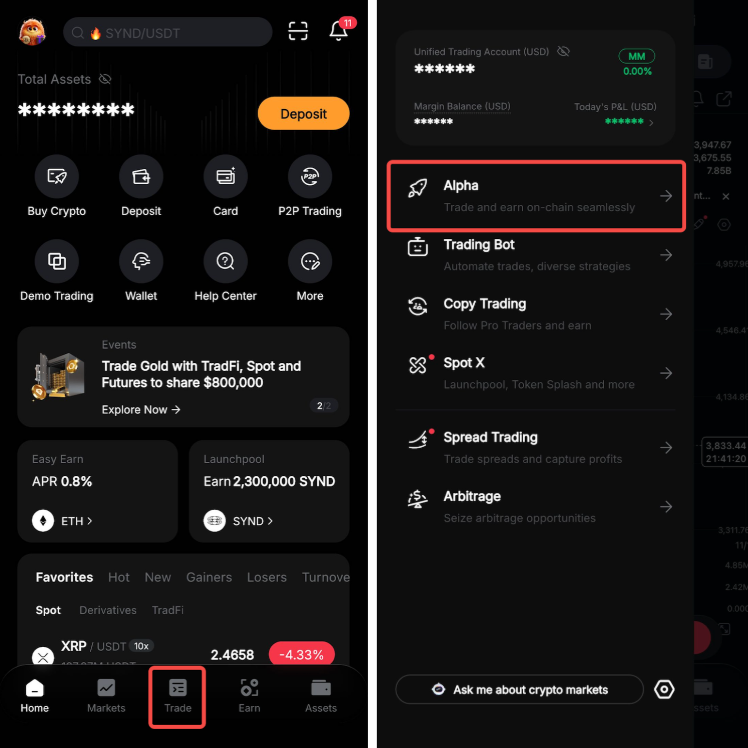
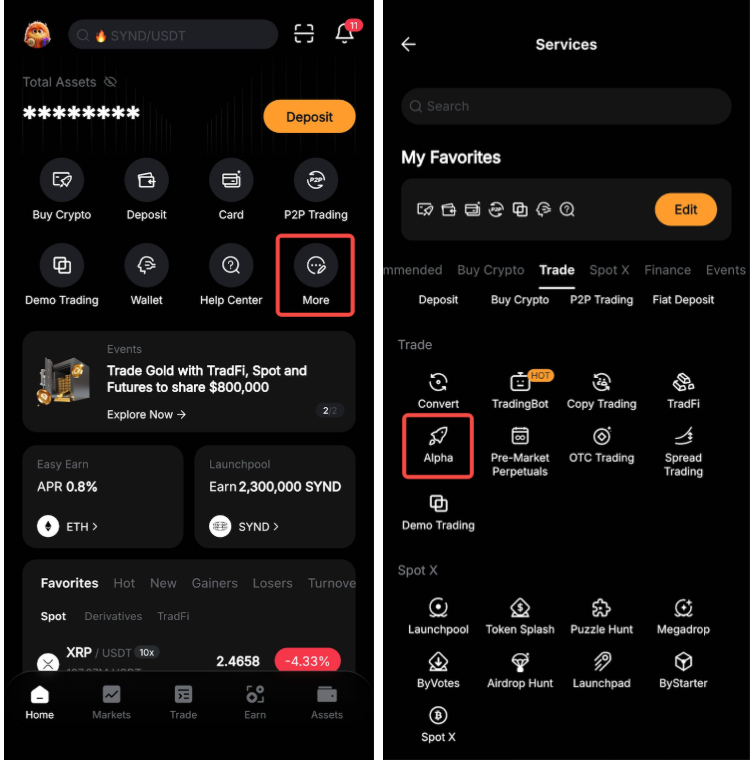
Langkah 1: Masuk ke Aplikasi Bybit dan akses Bybit Alpha dengan salah satu cara berikut:
a. Ketuk Trade di bilah bawah. Kemudian, ketuk ikon menu di sudut kiri atas dan pilih Alpha.
b. Ketuk Selengkapnya di halaman Beranda dan pilih Alpha di bagian Trade.
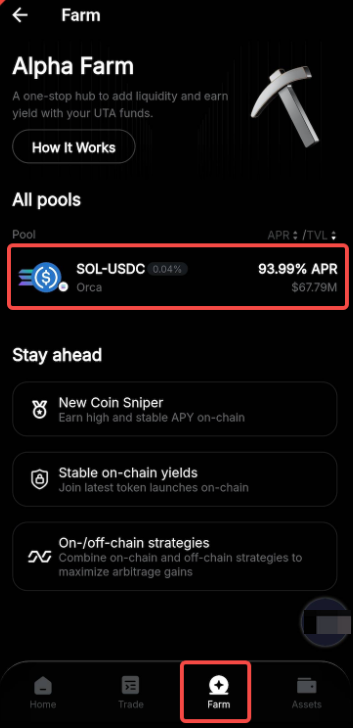
Langkah 2: Masuk ke tab Farm, jelajahi pool likuiditas yang tersedia pada Semua pool, dan pilih salah satu yang sesuai dengan tujuan investasi dan toleransi risiko Anda.
Langkah 3: Pilih rentang harga Anda — ini menentukan rentang yang akan digunakan secara aktif untuk likuiditas Anda. LP CLMM menawarkan tiga opsi:
- Stabil: Rentang yang lebih konservatif didesain untuk pengguna yang lebih menyukai volatilitas lebih rendah.
- Standar: Rentang moderat tang menyeimbangkan potensi imbal hasil dengan tingkat risiko terkontrol.
- Kustom: Rentang yang sepenuhnya dapat disesuaikan untuk pengguna berpengalaman yang ingin memiliki kontrol yang lebih presisi atas posisi likuiditas mereka.
Setelah memilih rentang yang diinginkan, ketuk Selanjutnya.
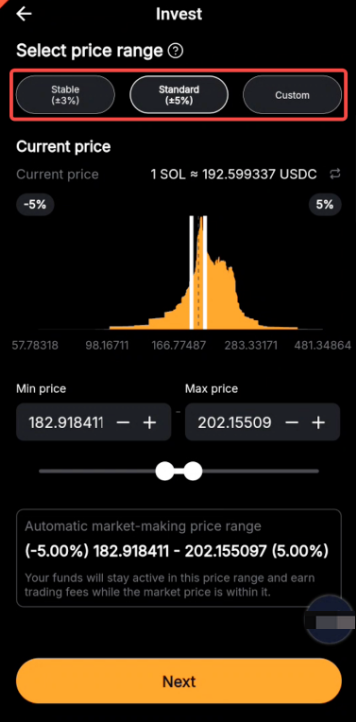
Catatan: Rentang harga yang tersedia dapat bervariasi pada berbagai pool.
Langkah 4: Masukkan jumlah mata uang kripto yang ingin Anda investasikan dalam pool likuiditas yang dipilih, lalu ketuk Investasi.
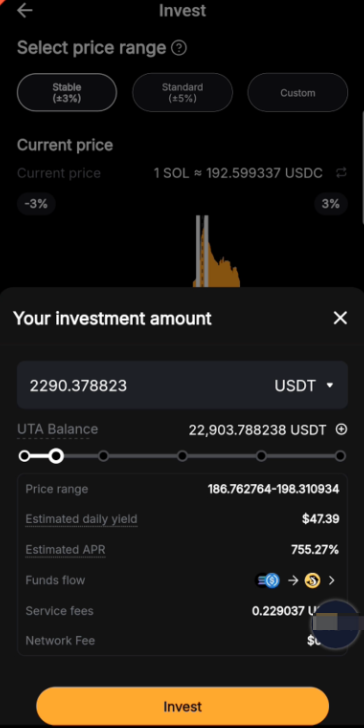
Langkah 5: Pada jendela konfirmasi, tinjau detail pesanan dan konfirmasi pesanan Anda. Dana Anda kemudian akan mulai berkontribusi dalam pool likuiditas.
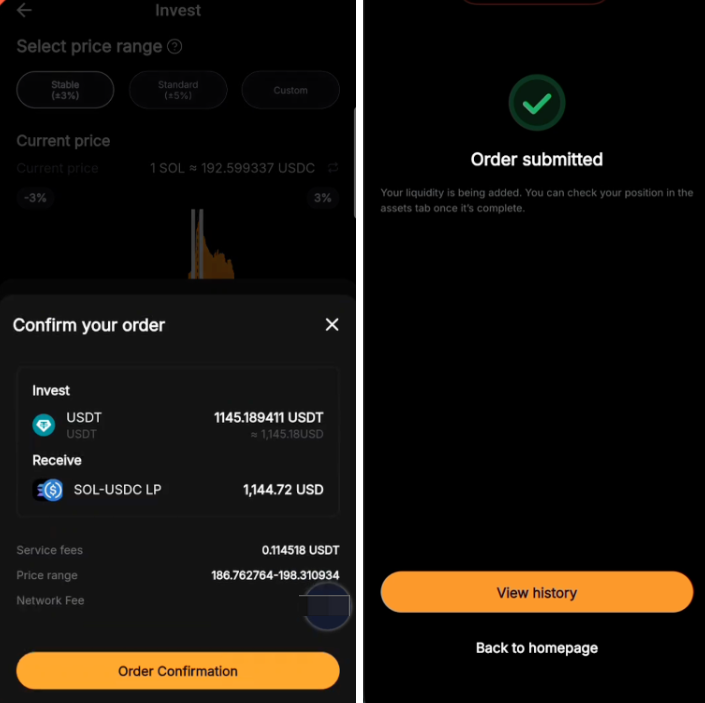
Anda dapat melihat riwayat pesanan Anda dengan mengetuk Lihat riwayat atau dengan membuka Aset di bilah bawah dan mengetuk ikon riwayat di sudut kanan atas. Untuk melacak pesanan aktif, buka Aset → Tab Farm.

Cara Investasikan Lebih Banyak di Posisi yang Sudah Ada
Langkah 1: Masuk ke Aset → Tab Farm untuk mengakses pesanan aktif Anda, lalu temukan pesanan investasi yang ingin Anda tambahkan lebih banyak dana.
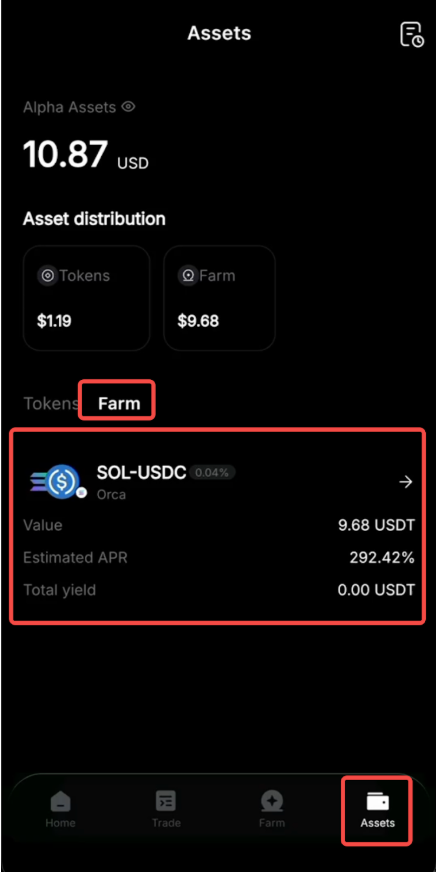
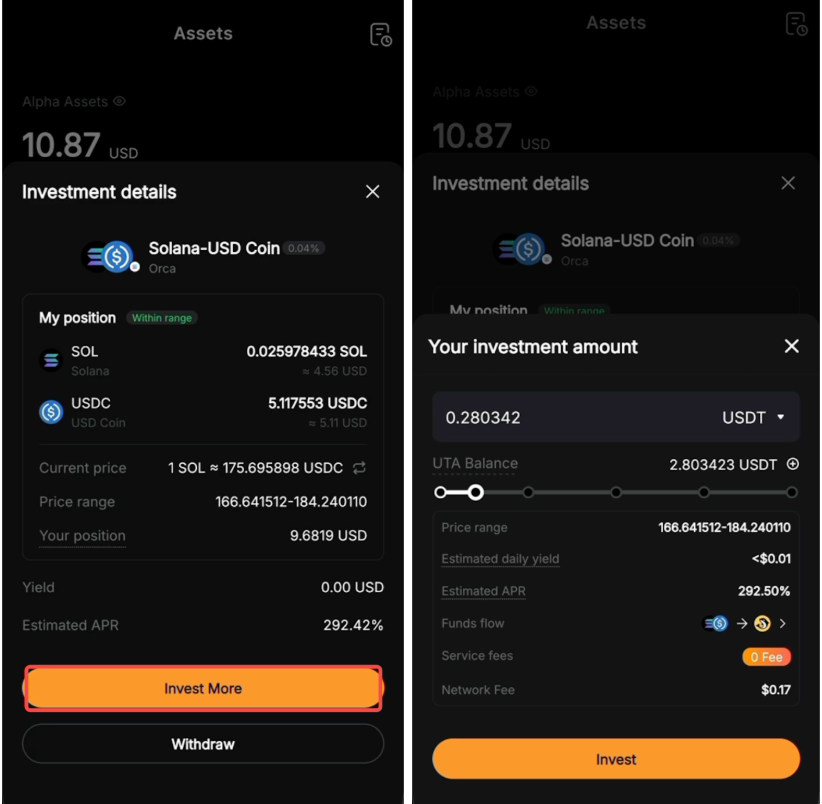
Langkah 2: Ketuk Investasikan Lebih Banyak untuk menambahkan lebih banyak dana ke posisi Anda saat ini dalam pool likuiditas tersebut dan berpotensi meningkatkan hadiah Anda. Masukkan jumlah yang diinginkan, lalu ketuk Investasi untuk menyelesaikan proses.
Cara Penarikan Likuiditas dan Tebus Hadiah
Langkah 1: Masuk ke Aset → Tab Farm untuk melihat pesanan aktif Anda.
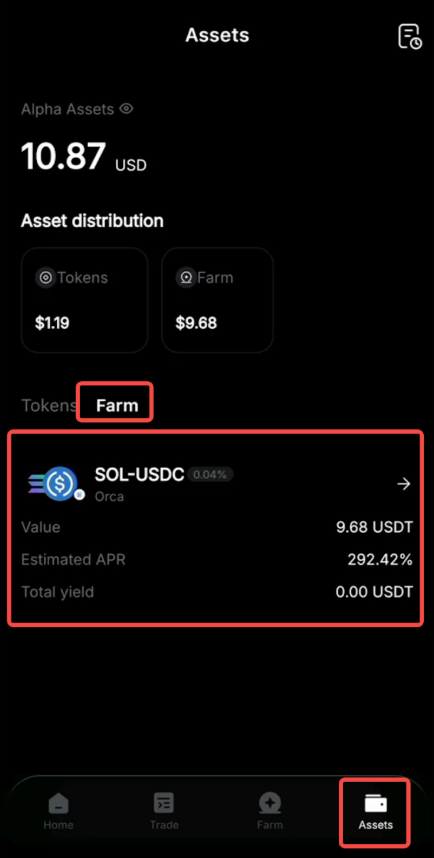
Langkah 2: Ketuk opsi Penarikan untuk pesanan yang ingin Anda tebus. Masukkan jumlah yang ingin Anda tebus.
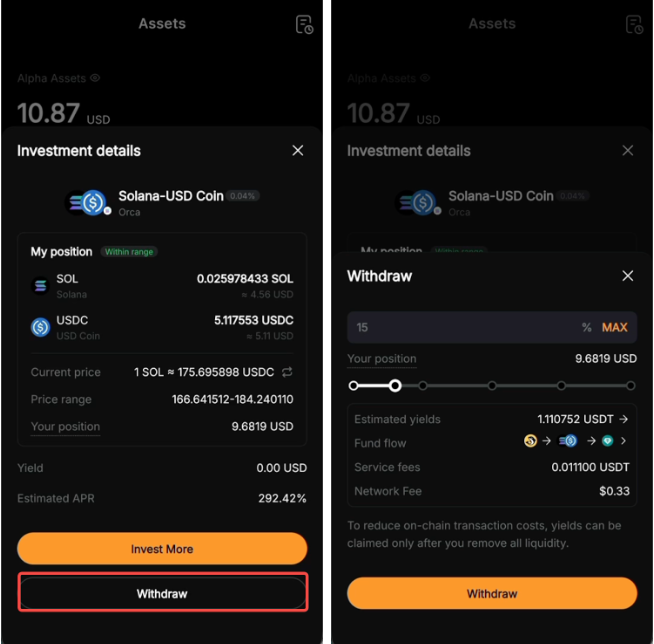
Catatan:
— Jika Anda memilih lebih dari 90% dari posisi Anda, semua likuiditas akan ditarik.
— Modal Anda dan hasil (kecuali biaya terkait) akan dikembalikan ke UTA Anda.
— Untuk membantu mengurangi biaya transaksi on-chain, hasil hanya dapat diklaim setelah semua likuiditas ditarik.