This article explains how funding fees work on Bybit, including how they are calculated, charged, and displayed, as well as how to view your records and manage notifications.
What Is Funding Fee
When Is Funding Fee Charged
How Is Funding Fee Deducted
How Is Funding Fee Calculated
USDT Perpetual Contracts
USDC Perpetual Contracts
Inverse Perpetual Contracts
How to View Your Funding Fee Records
How to Subscribe to and Manage Funding Fee Reminders
How to Subscribe to Funding Fee Limit Notifications
What Is Funding Fee
Funding is a mechanism designed to keep the price of Bybit Perpetual Contracts closely aligned with the global spot price. It works similarly to the cost of holding a leveraged position, comparable to interest in Spot Margin Trading.
Funding fees are exchanged directly between long and short position holders at each funding time. Traders will only pay or receive funding fees if they hold positions at that time.
During periods of high market volatility, Bybit may adjust funding rate limits to help stabilize the price of Perpetual Contracts.
When Is Funding Fee Charged
Each trading pair may have different funding intervals and funding rate limits.
For example, if a contract uses an 8-hour funding interval, funding will occur at:
- 12AM UTC
- 8AM UTC
- 4PM UTC
When the funding rate is positive, long position holders pay short position holders. When the funding rate is negative, short position holders pay long position holders.
Traders will only pay or receive funding fees if they hold positions at the funding time. If a position is fully closed before the funding time, no funding fee will be charged or received.
If a Perpetual Contract's funding rate reaches its preset upper or lower limit during settlement, the system will automatically switch the settlement frequency to once per hour to better reflect market conditions in real time. Future funding rate limits and settlement frequencies may be adjusted dynamically without separate announcements.
To view the current funding interval or funding rate limits, please visit here.
How Is Funding Fee Deducted
The funding fee is deducted from the trader's available balance. If the available balance is insufficient:
- The funding fee will be deducted from the position's initial margin.
- The liquidation price will move closer to the mark price, and liquidation risk may increase (applicable to Isolated Margin mode only).
Traders are advised to maintain a sufficient available balance to reduce liquidation risk.
Note: Due to the complexity of funding fee settlement, the system may take a few seconds to complete all funding fee exchanges between buyers and sellers on the platform. As a result, opening or closing a position within 5 seconds before or after the funding time does not guarantee whether the position will be included in that funding cycle. Bybit does not provide reimbursements in such cases, as the counterparty to the trade would have also paid or received the corresponding funding fees.
How Is Funding Fee Calculated
The funding rate consists of two components: the Interest Rate (I) and the Average Premium Index (P). The resulting funding rate is then applied to the position value to determine the funding fee payable or receivable at the funding time.
For a detailed explanation of how the funding rate is calculated, refer to Introduction to Funding Rate.
USDT Perpetual Contracts
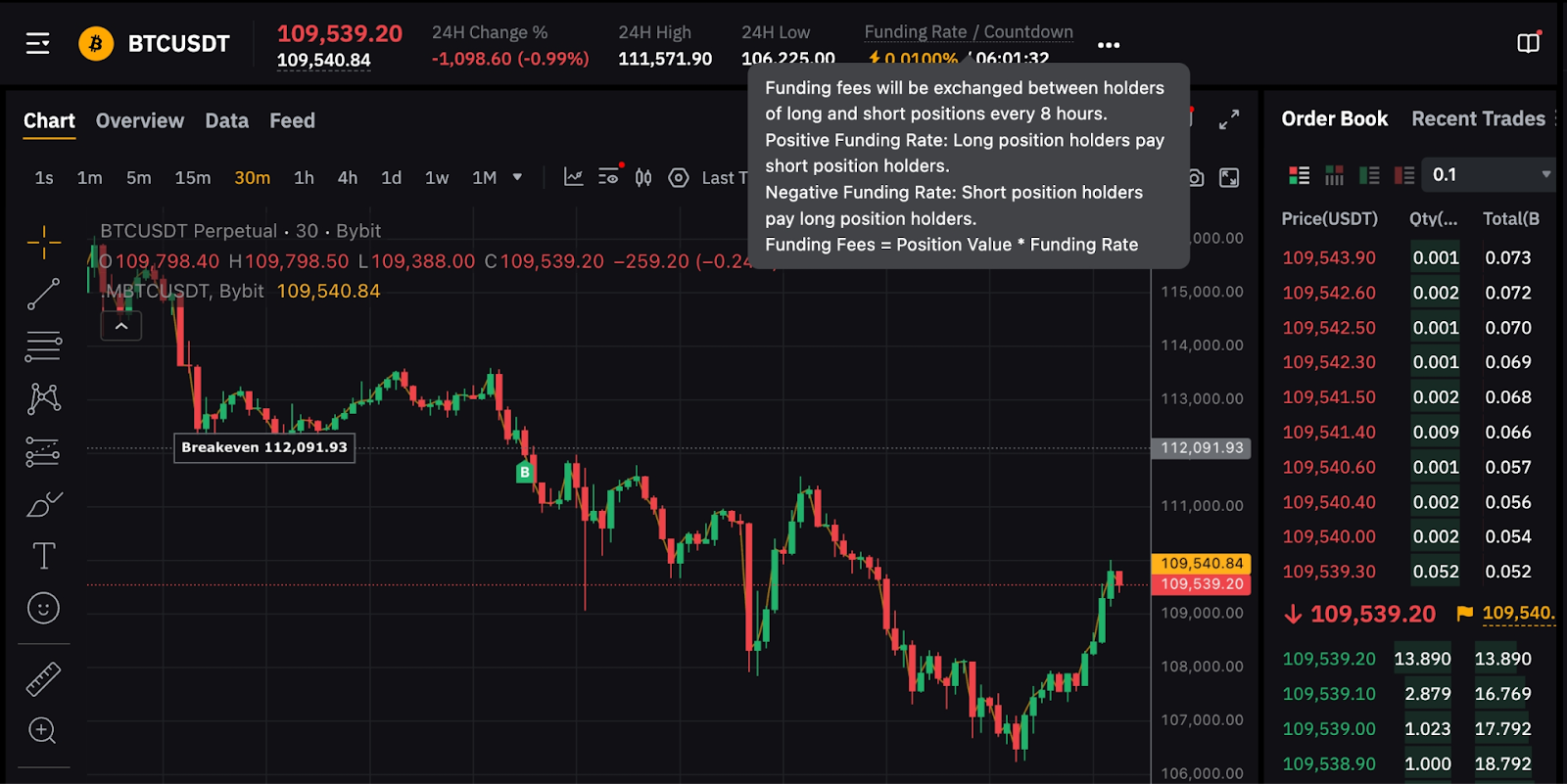
Using the example shown in the screenshot above, long position holders will pay a funding fee of 0.01% to short position holders.
The funding fee is calculated as follows:
Funding fee = Position value × Funding rate
Position value = Contract quantity × Mark price
Example
Trader A holds a long position of 10 BTC contracts. At the funding time, the mark price is 8,000 USDT, and the current funding rate is 0.01%.
First, calculate the position value:
Position value = 10 × 8,000 USDT = 80,000 USDT
Next, calculate the funding fee:
Funding fee = 80,000 USDT × 0.01% = 8 USDT
Since the funding rate is positive (0.01%), long position holders pay short position holders. Therefore, Trader A will pay a funding fee of 8 USDT, while a short position holder with the same contract quantity will receive 8 USDT.
USDC Perpetual Contracts
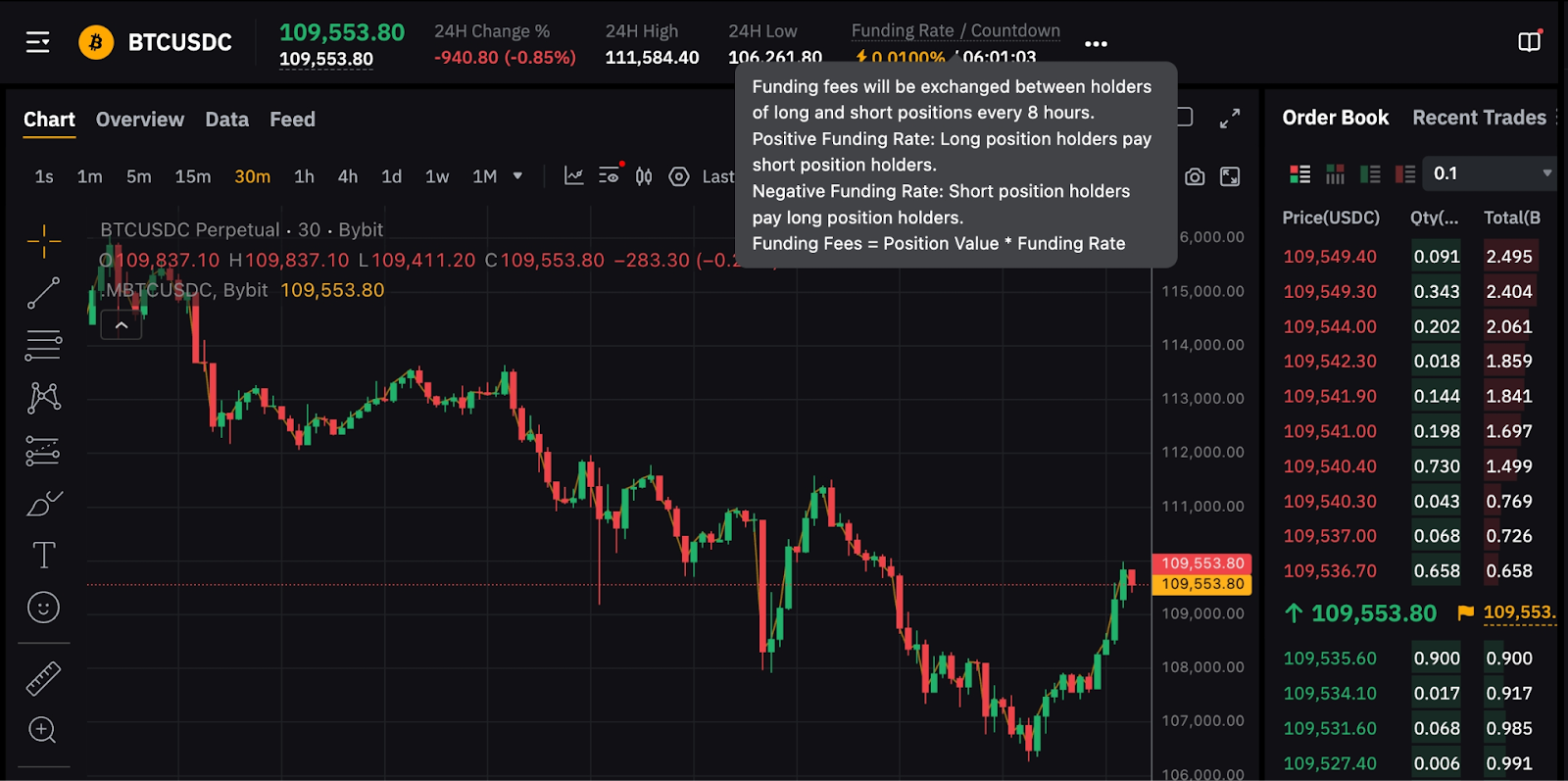
Using the example shown in the screenshot above, long position holders who hold positions at the funding time will pay a funding fee of 0.01% to short position holders.
The funding fee is calculated as follows:
Funding fee = Position value × Funding rate
Position value = Contract quantity × Mark price
Example
Trader A holds a long position of 10 BTC contracts. At the funding time, the mark price is 50,000 USDC, and the current funding rate is 0.01%.
First, calculate the position value:
Position value = 10 × 50,000 USDC = 500,000 USDC
Next, calculate the funding fee:
Funding fee = 500,000 USDC × 0.01% = 50 USDC
Since the funding rate is positive (0.01%), long position holders pay short position holders. Therefore, Trader A will pay a funding fee of 50 USDC, while a short position holder with the same contract quantity will receive 50 USDC.
Inverse Perpetual Contracts
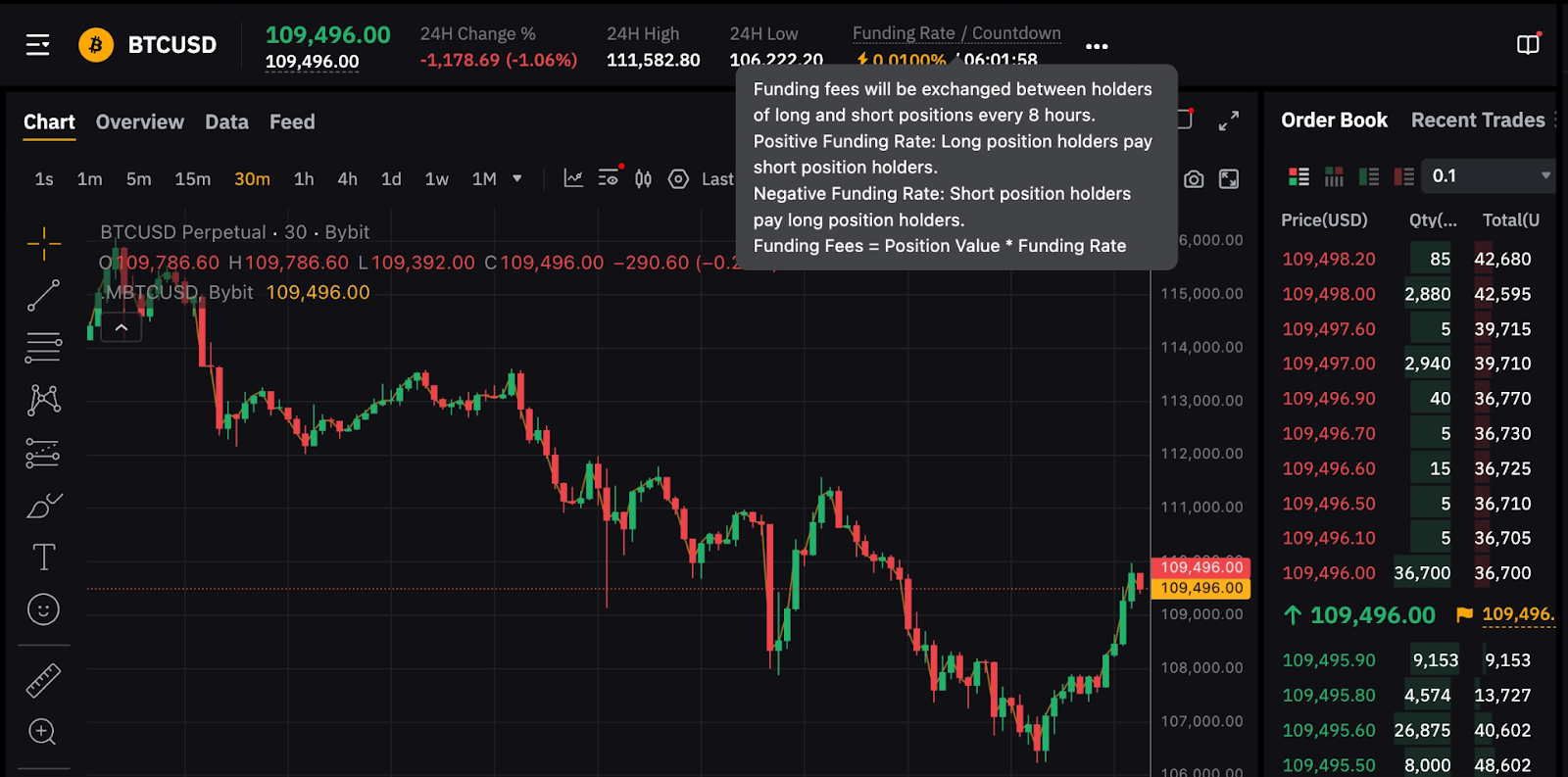
Using the example shown in the screenshot above, in approximately 8 hours, long position holders will pay a funding fee of 0.01% to short position holders.
The funding fee is calculated as follows:
Funding fee = Position value × Funding rate
Position value = Contract quantity ÷ Mark price
Example
Trader A holds a long position of 10,000 BTCUSD contracts. At the funding time, the mark price is 8,000 USD, and the current funding rate is 0.01%.
First, calculate the position value:
Position value = 10,000 ÷ 8,000 = 1.25 BTC
Next, calculate the funding fee:
Funding fee = 1.25 BTC × 0.01% = 0.000125 BTC
Since the funding rate is positive (0.01%), long position holders pay short position holders. Therefore, Trader A will pay a funding fee of 0.000125 BTC, while a short position holder with the same contract quantity will receive 0.000125 BTC.
How to View Your Funding Fee Records
You can view your funding fee records in the Trade History and Transaction Log of your Unified Trading Account (UTA).
Via Trade History
From the Orders dropdown menu in the top navigation bar, select Unified Trading Order → Futures → Trade History. Then, set the Filled Type column to Funding to view the funding fee rates and trading fees.
Please note that when the fee rate and fee are positive, it means you paid the funding fee. When both are negative, it means you received the funding fee.
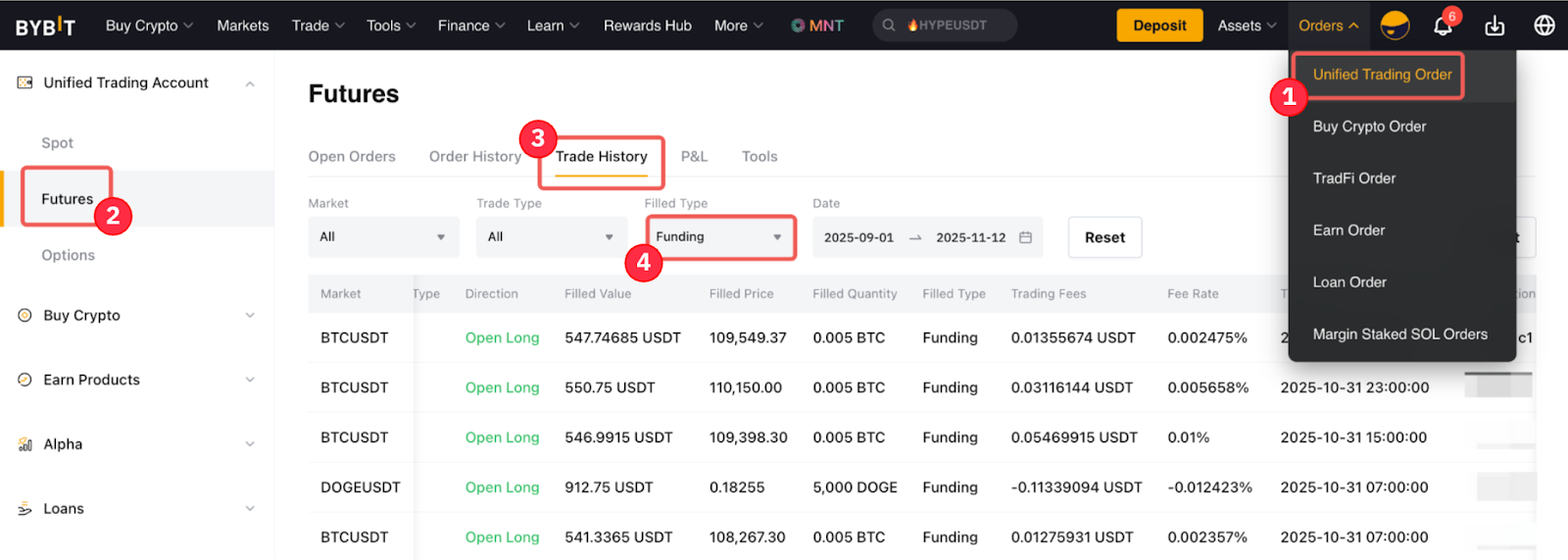
Example:
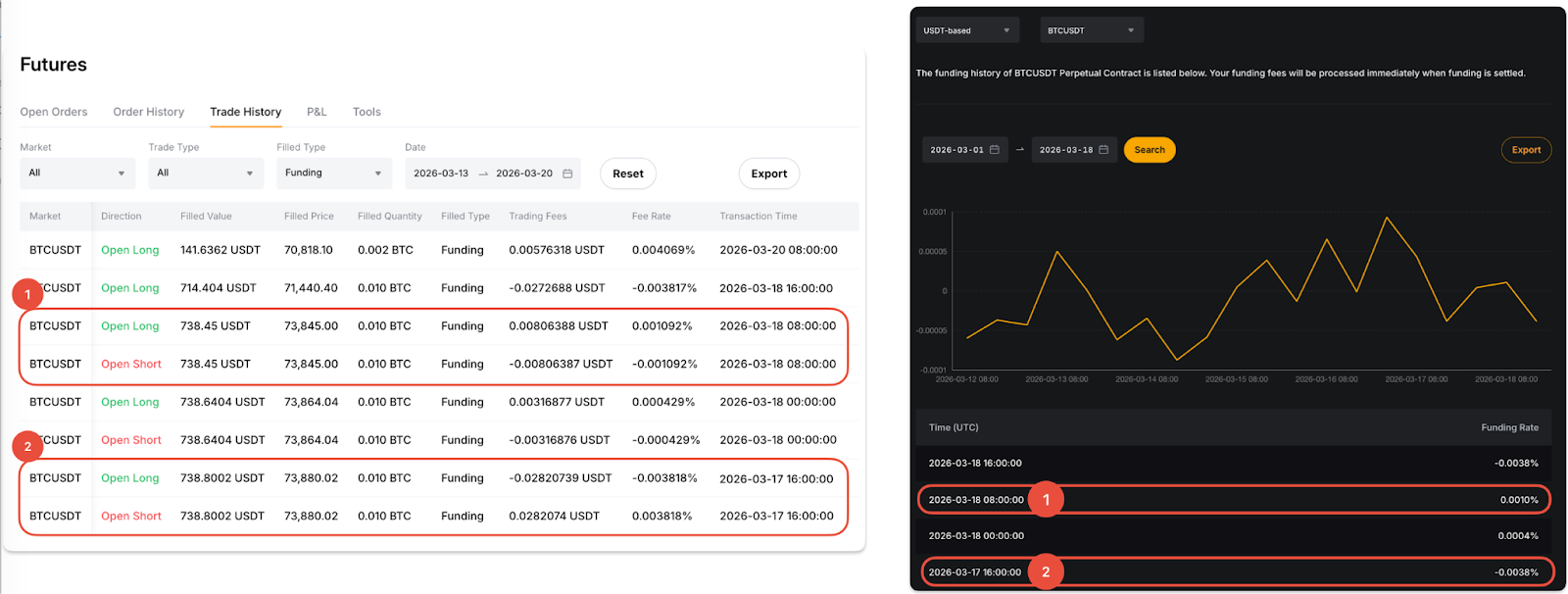
Assume Trader A holds both long and short BTCUSDT positions. The funding fee records shown in Trade History will appear as follows:
1. Mar 18, 2026, 8AM UTC (funding rate: 0.0010%)
- A positive fee rate (same direction as the funding rate) is shown for the long position, indicating that the trader paid funding fees.
- A negative fee rate (opposite direction to the funding rate) is shown for the short position, indicating that the trader received funding fees.
2. Mar 17, 2026, 5PM UTC (funding rate: -0.0038%)
- A negative fee rate (same direction as the funding rate) is shown for the long position, indicating that the trader received funding fees.
- A positive fee rate (opposite direction to the funding rate) is shown for the short position, indicating that the trader paid funding fees.
Please refer to the screenshot below for illustration.
Via Transaction Log
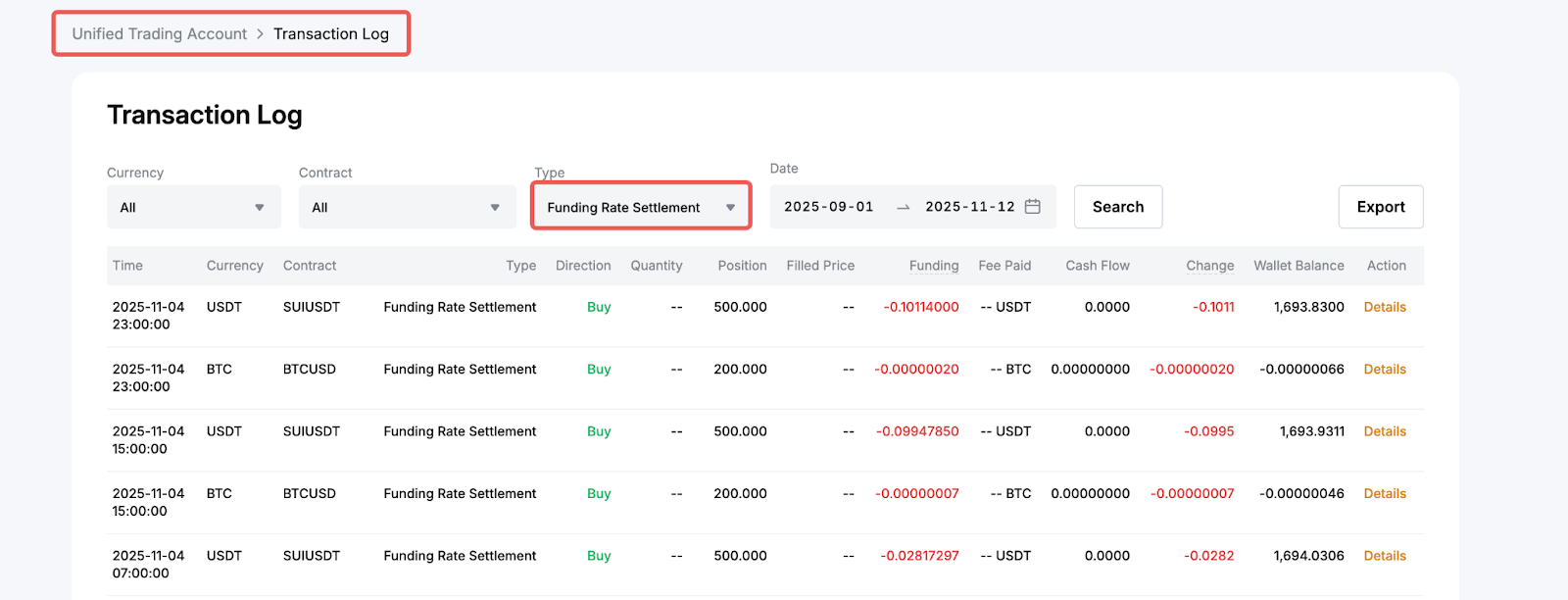
Navigate to the UTA Transaction Log and set the transaction type to Funding Rate Settlement. In the Funding column, you can view the funding fee paid or received at each funding cycle.
How to Subscribe to and Manage Funding Fee Reminders
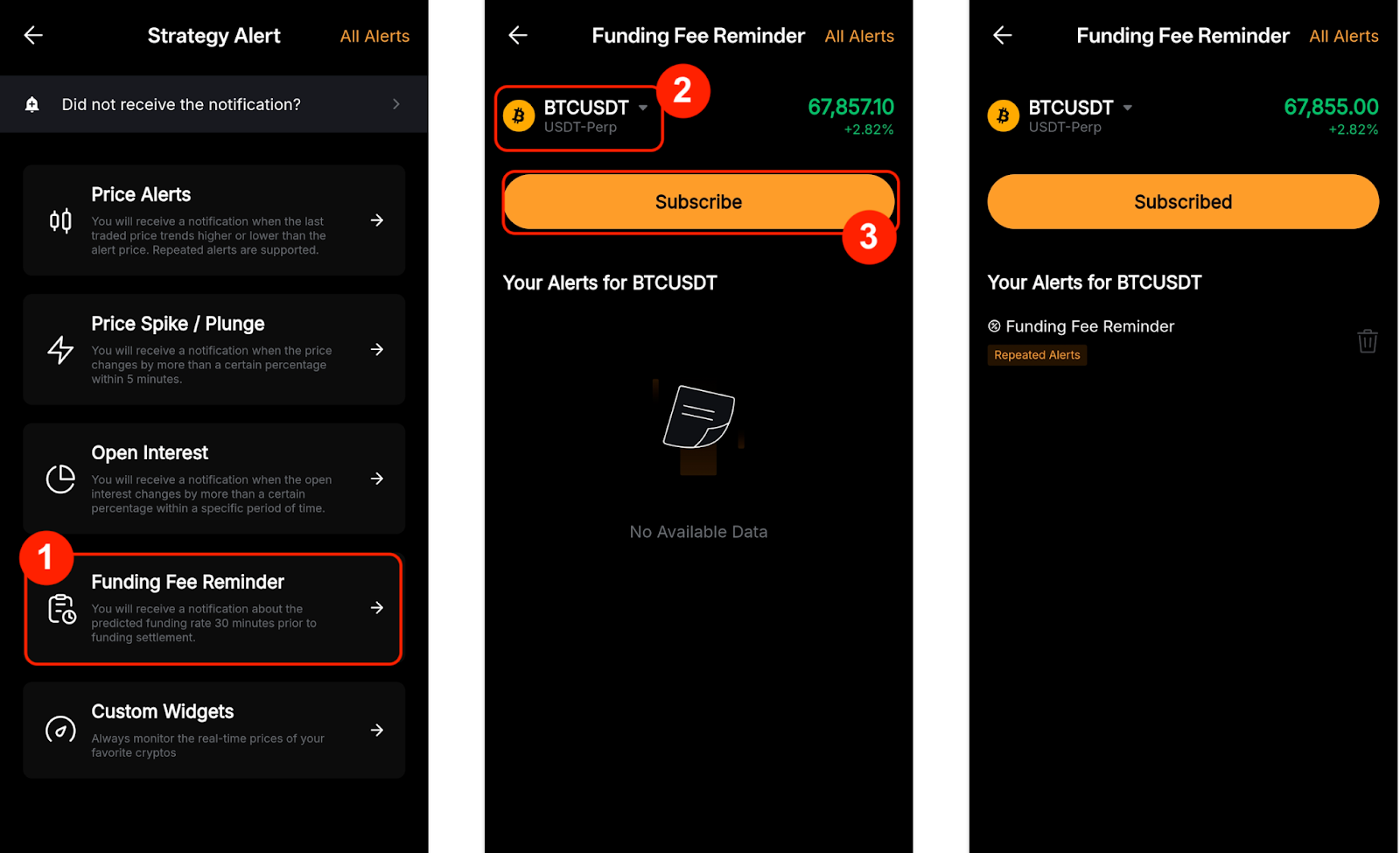
You can enable the Funding Fee Reminder to receive a push notification of the predicted funding rate 30 minutes before the funding time. Currently, this feature is only available on the Bybit App.
To subscribe to the reminder:
Step 1: Go to Trade and tap the notification icon (bell) in the top right corner.
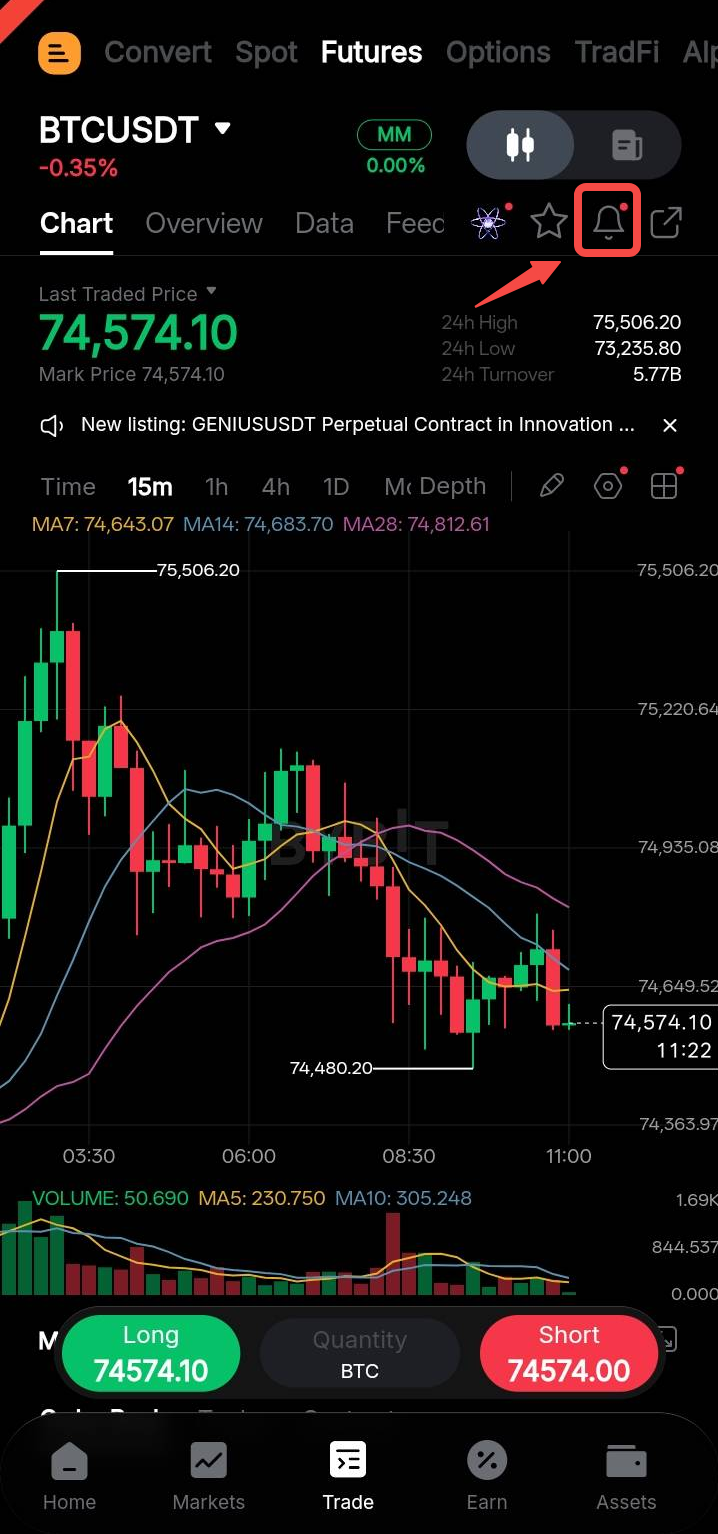
Step 2: On the Strategy Alert page, select Funding Fee Reminder. Choose the trading pair you would like to subscribe to, then tap Subscribe to complete the setup.
To manage your subscriptions:
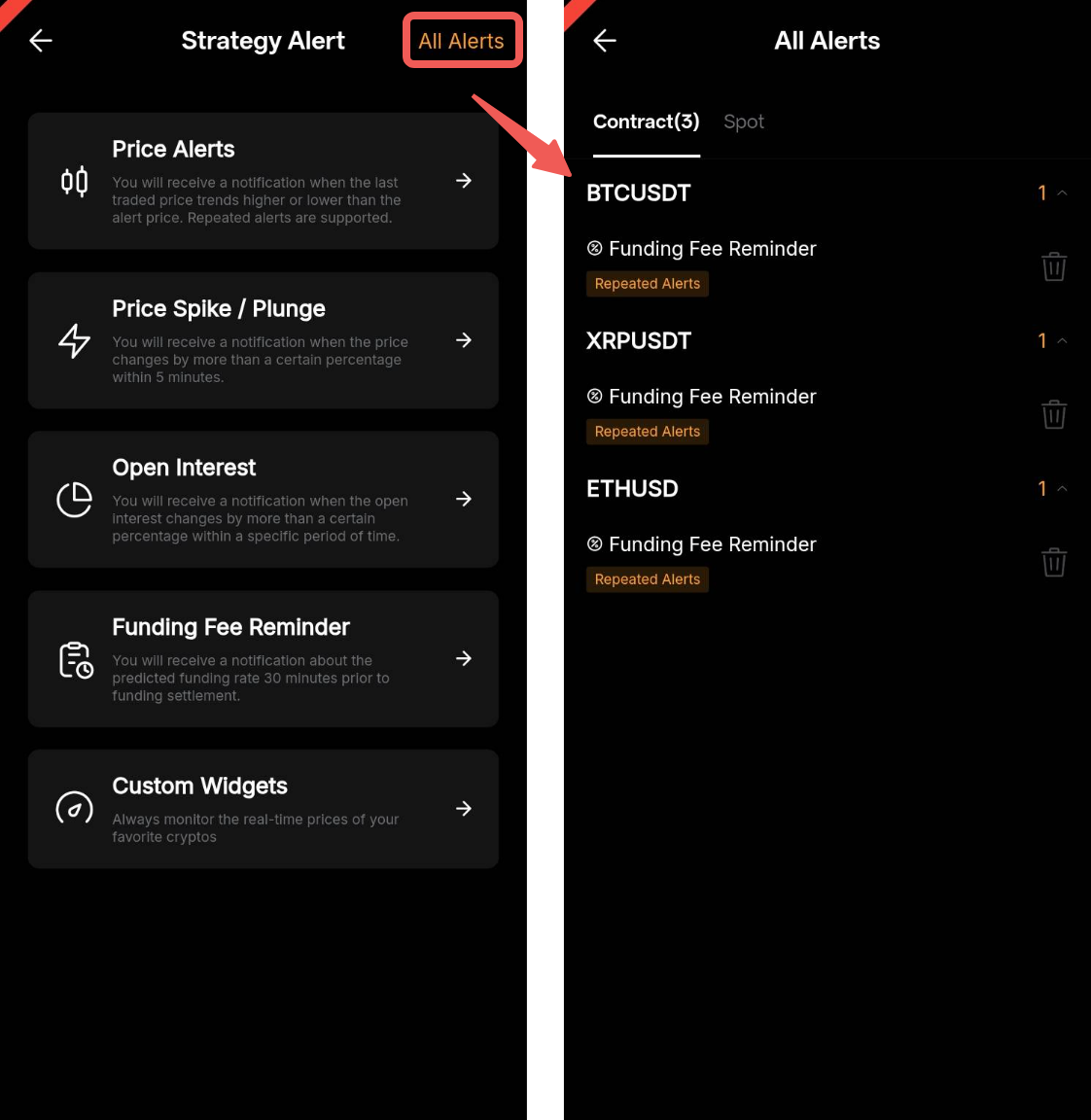
Go to All Alerts in the top-right corner of the Strategy Alert page. Tap the trading pair to view or manage your subscribed reminders.
How to Subscribe to Funding Fee Limit Notifications
To receive a notification when the funding rate moves outside your specified range or reaches your defined upper or lower limit, follow the steps below.
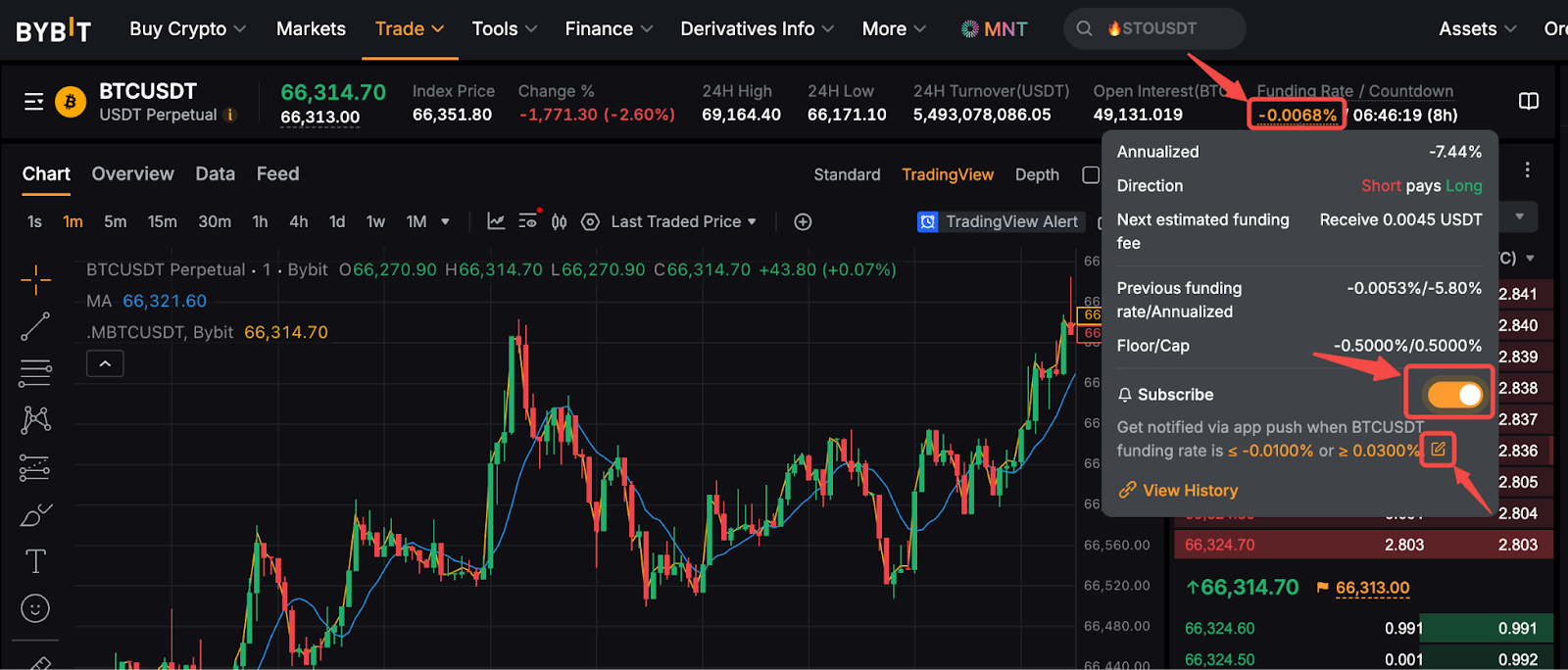
Go to the trading page for your desired trading pair and click the Funding Rate section above the trading chart.
A pop-up window will appear with detailed funding rate information. From there, you can enable push notifications and set your preferred funding rate notification range.