
Enhanced Due Diligence (EDD) is an additional verification process that Bybit may require for certain services, including deposits, withdrawals, Buy Crypto, the Bybit Card, and other applicable fiat services.
EDD is a standard security measure used by financial institutions to protect users and maintain the integrity of the platform. It helps ensure compliance with regulatory requirements and supports our ongoing efforts to prevent financial risks such as fraud and money laundering.
Here is a guide on how to complete Enhanced Due Diligence (EDD) Verification and check on your submissions.
Why EDD May Be Required
Documents to Be Provided
How to Complete EDD Verification
How to Check My EDD Request Status
How to Cancel a Transaction Requiring EDD Verification
Why EDD May Be Required
In some cases, users may be asked to complete EDD even if their account has already been verified. This additional step allows Bybit to collect further information to better understand your specific circumstances, mitigate potential risks, and ensure your account remains compliant with the latest regulatory and security standards. It also helps us maintain a safe and reliable environment for all users.
Please note that failure to submit the required information within the specified timeframe may result in:
- Restrictions on certain account functions, including deposits, withdrawals or trading
- Delays in processing transactions
Documents to Be Provided
When completing EDD verification, you may be required to submit the following documents or information:
- Proof of Identity (POI), such as your ID card, passport or driver's license;
- Proof of Address (POA), such as your utility bills, tax returns, or government-issued certificates of residence; and/or
- Source of Funds (SOF) and/or Source of Wealth (SOW). For more information about SOF or SOW requirements, please refer to this article.
How to Complete EDD Verification
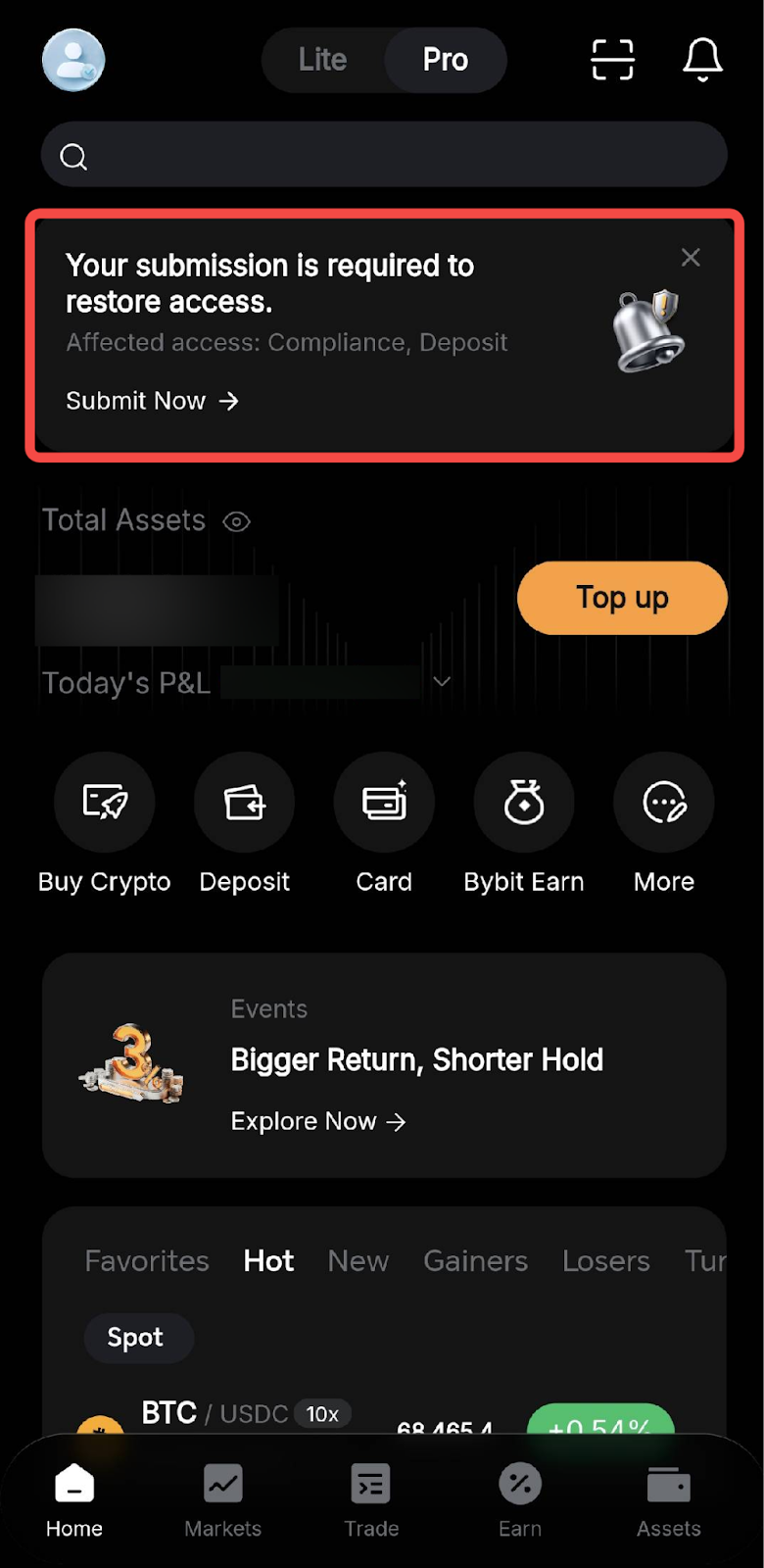
Step 1: Log in to the Bybit App. A submission prompt will appear at the top of the Home page if EDD is required.
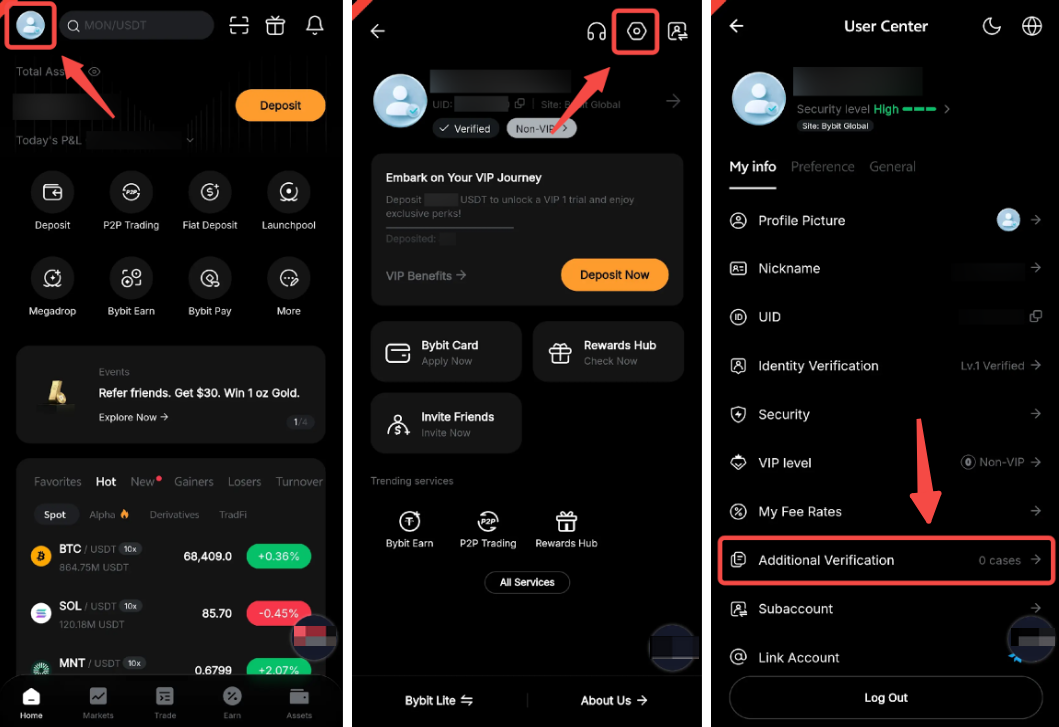
You can also access all EDD requests directly by tapping the Profile icon → Settings → Additional Verification.
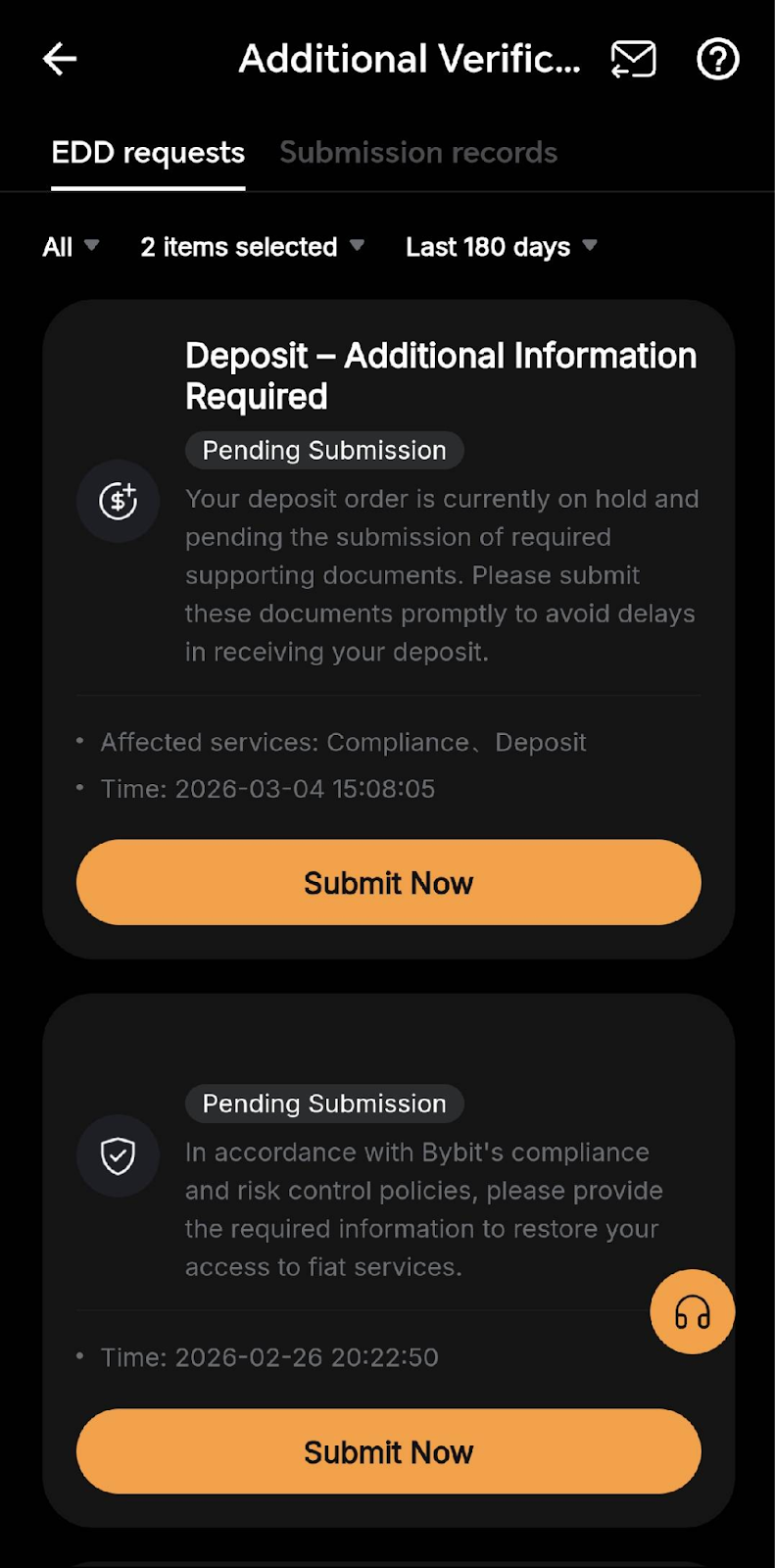
Step 2: Tap Submit Now to open the EDD questionnaire. If you have more than one pending request, you will be directed to the Additional Verification page. Select the relevant request and tap Submit Now.
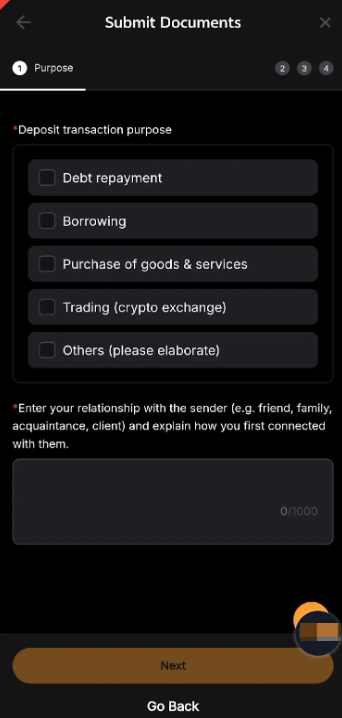
Step 3: Complete all required questions based on your personal circumstances, then tap Submit.
A status pop-up will appear to confirm your submission! Reviews may take up to 5 business days. You'll be notified by email once the review is complete.
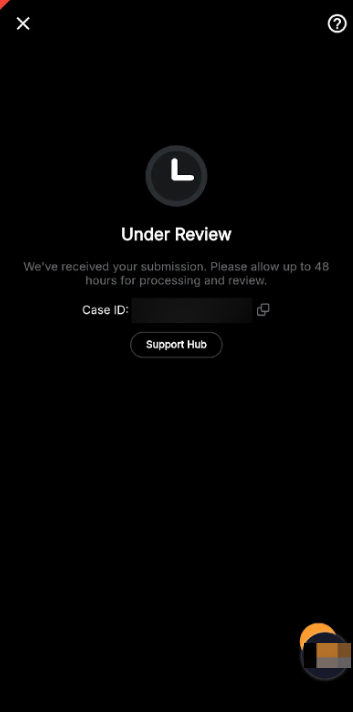
Notes:
– The EDD verification prompt may also appear during a fiat deposit or withdrawal, or while using other applicable services. In such cases, please follow the on-screen instructions to complete your submission.
– Even if you dismiss the EDD prompt on the homepage, you can still access your EDD requests at any time via the Additional Verification page or the Support Hub.
– Please rest assured that Bybit handles all user information securely in accordance with applicable data protection and privacy regulations and uses it solely for compliance purposes.
How to Check My EDD Request Status
Log in to the Bybit App and go to the Profile icon → Settings → Additional Verification.
Under EDD requests, you will see a list of your EDD requests and their current status:
- Pending submission: Required information has not yet been submitted.
- Under review: Your submission is currently being reviewed by our team.
- Approved: Your submission has been successfully verified.
- Pending resubmission: You need to resubmit the required information.
- Rejected: Your submission could not be verified.
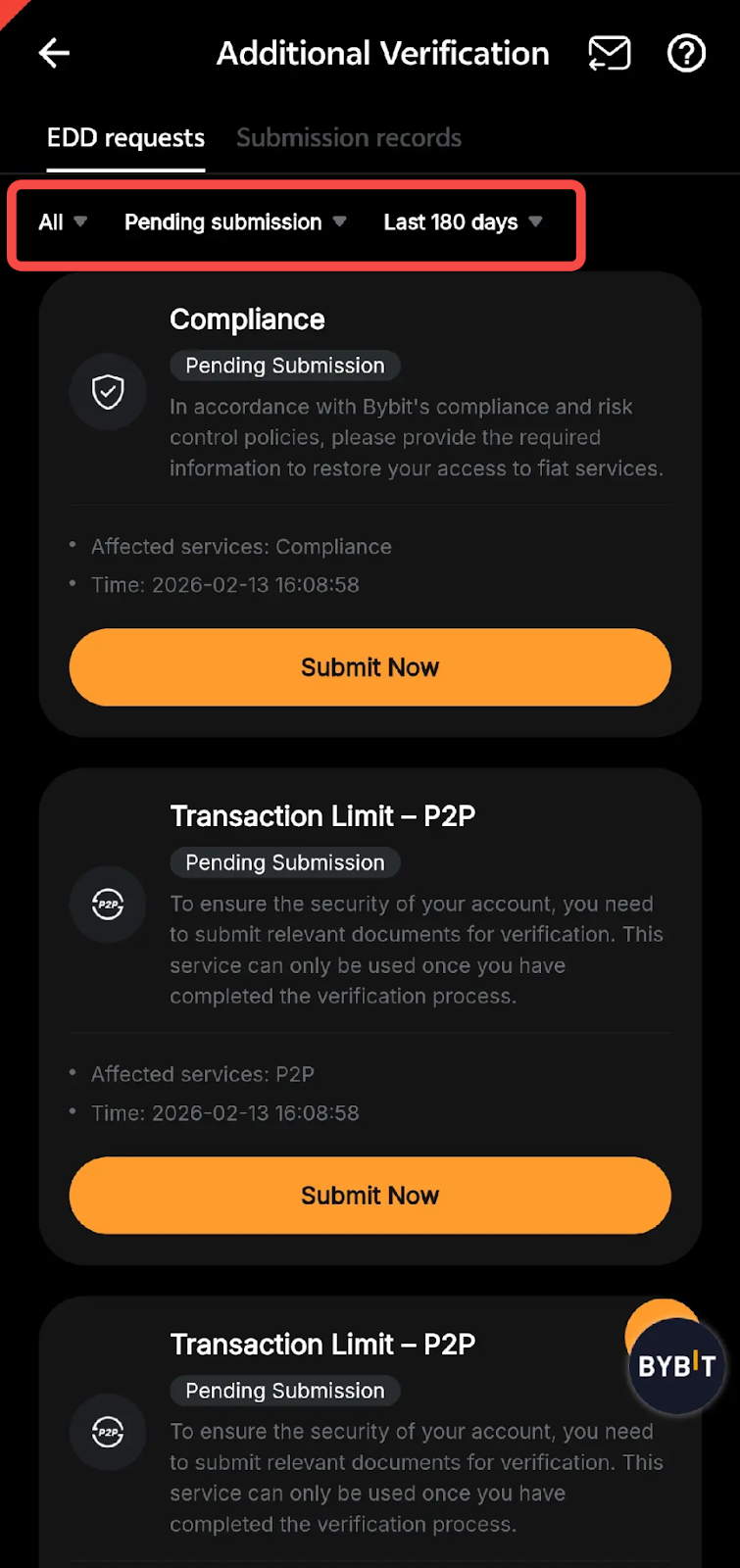
You can also filter requests by service type, status or time period or tap Submission records to view the documents you have submitted. Tapping Resubmit or Upload will allow you to replace or submit additional documents.
How to Cancel a Transaction Requiring EDD Verification
If EDD verification is required for your transaction to be processed and you prefer not to proceed, you can cancel the transaction through the Support Hub by following the steps below.
Step 1: Log in to the Bybit App, tap More, scroll down to Help Center, and select Support Hub.
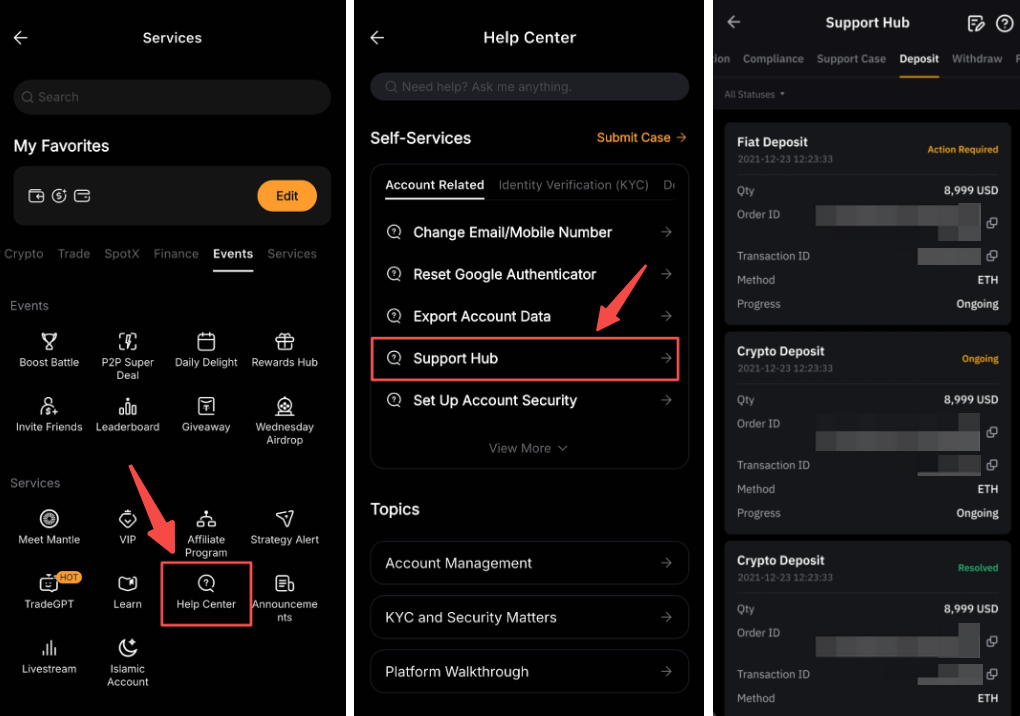
Step 2: Under Deposit/Withdrawal, tap Cancel next to the transaction you wish to cancel.
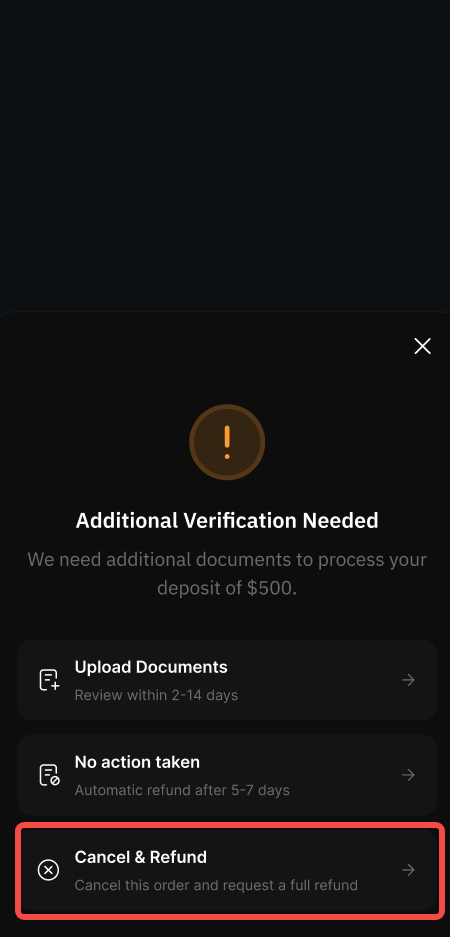
Step 3: On the confirmation pop-up, tap Yes, cancel to proceed.
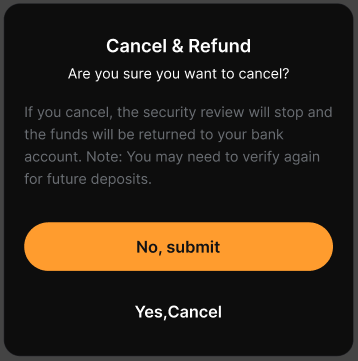
Step 4: Once your cancellation request is approved, you will be notified by email and push notification. Funds are typically returned immediately. However, in rare cases, the process may take up to 12 hours.
- For deposits, funds will be refunded in full to the original payment method.
- For withdrawals, funds will be refunded in full to your Funding Account.
Notes:
– Currently, EDD requests can be canceled for deposits, withdrawals, cross-region transfers, buying or selling crypto with fiat, Bybit Card applications, and other scenarios covered by the Travel Rule.
– You can only cancel a transaction when its EDD status is Action required. If the status is Under review or Rejected, cancellation will not be available, and you will need to submit the required information to complete verification.
– Even if you cancel the EDD request for this transaction, you may still be prompted to complete EDD the next time you initiate the same transaction.
For more information on EDD verification, please refer to FAQ — Enhanced Due Diligence (EDD) Verification.