
Bybit Prediction is a feature within Bybit Alpha that allows you to trade on the outcomes of real-world events using USDC directly from your Bybit account. This guide will walk you through the requirements and steps for placing your first prediction market trade.
Before You Begin
Before placing your first trade, make sure you meet the following requirements:
- Verified Bybit account: Identity Verification and applicable AML (Anti-Money Laundering) and sanctions screening are required. If you have not completed verification, go to the account settings to get started.
- USDC in your Bybit account: All prediction market trades are settled in USDC. The minimum order size is 5 USDC. If needed, you can convert other assets to USDC using Bybit Convert.
- Supported region: Prediction markets are only available in supported regions. Eligible regions at launch include Bolivia, Chile, Algeria, Guatemala, Honduras, Mexico, Paraguay, Venezuela, Zambia, Belarus, Kyrgyzstan, Ghana, Morocco, Costa Rica, Haiti, Belize, Nicaragua, Mozambique, Malawi, Madagascar, Sierra Leone, Togo, Benin, Liberia, Lesotho, Eswatini, Guinea-Bissau, Namibia, Botswana, Rwanda, the Democratic Republic of the Congo, the Republic of the Congo, and the Solomon Islands.
Note: Bybit reserves the right to apply additional eligibility requirements, including age, residency, and enhanced due diligence requirements. Bybit also reserves the right to update the list of eligible regions and may suspend or restrict access to Bybit Prediction at any time without prior notice.
How to Make a Trade on Bybit Prediction
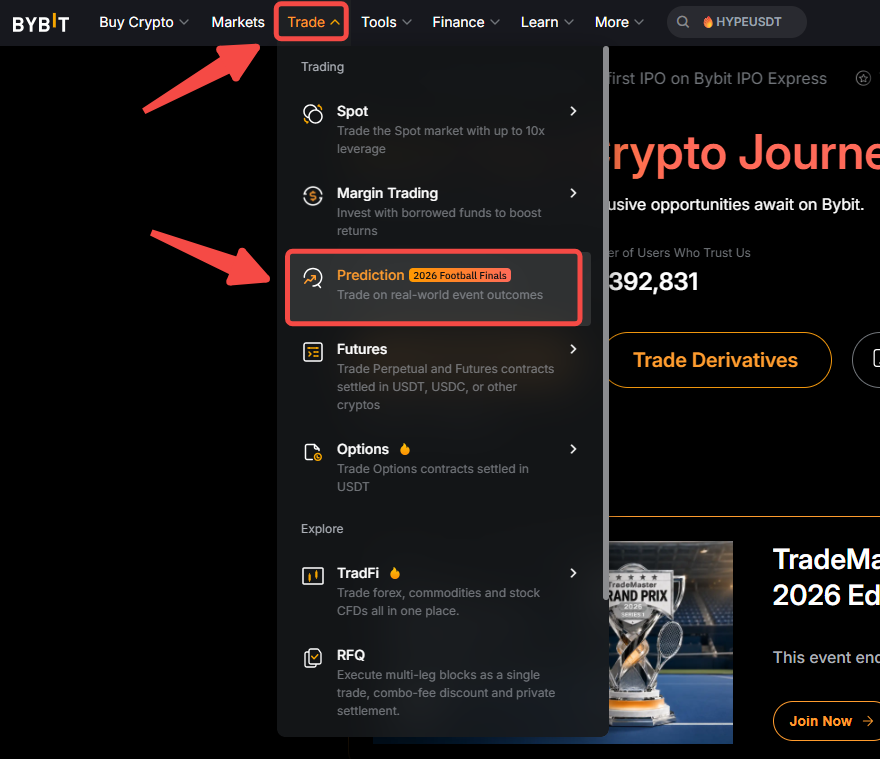
Step 1: Log in to your Bybit account, hover over Trade in the top navigation bar, then select Prediction.
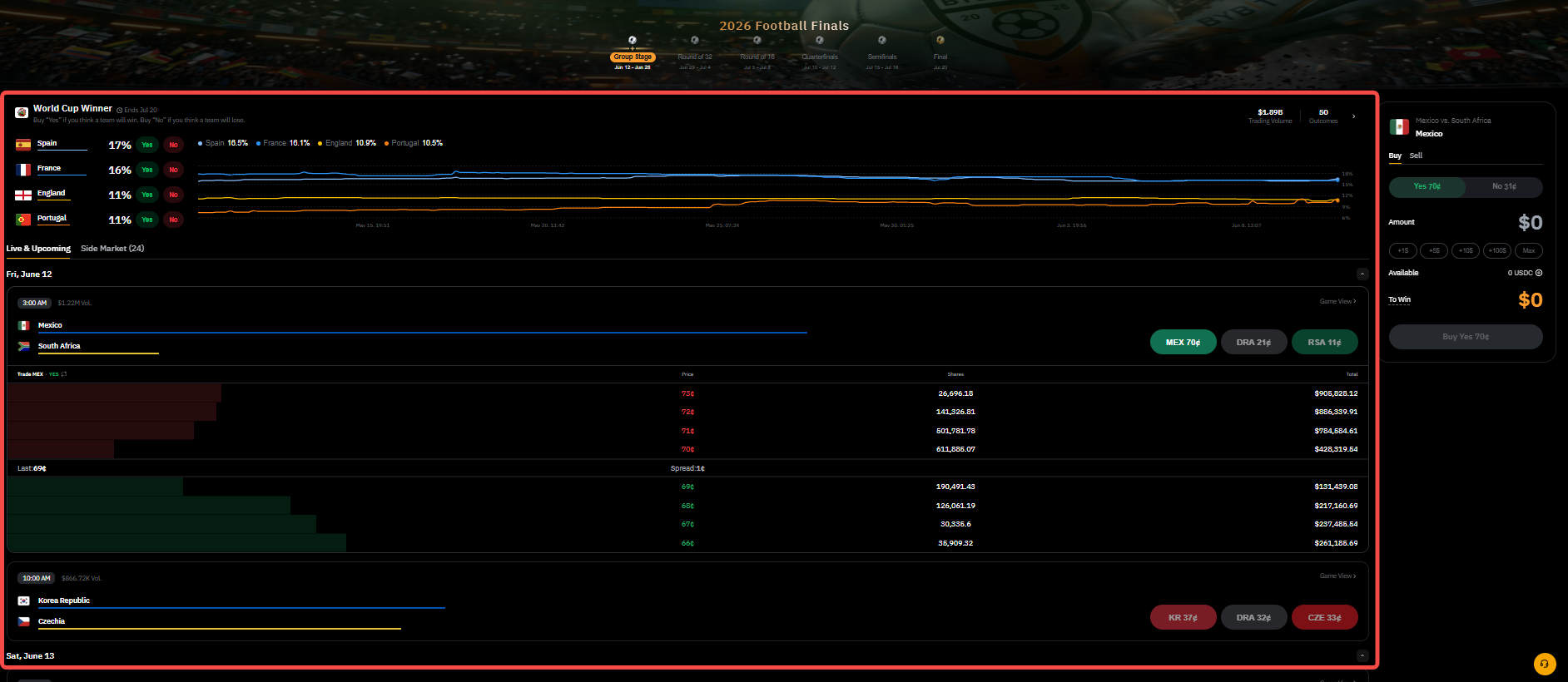
Step 2: Browse available events by category. Click an event to open its details page. Here, you can view:
- The available outcomes (for example, "Argentina wins" and "Argentina does not win").
- The current prices for YES and NO shares (ranging from 0 USDC to 1 USDC).
- The implied probability of each outcome.
Notes:
— At launch, Bybit Prediction focuses on the sport event and supports market types such as Match Winner, Tournament Winner, and Group Winner.
— The price of a share reflects the market's implied probability of an outcome occurring:
- Lower-priced shares correspond to outcomes that the market considers less likely and generally offer higher potential returns if the outcome occurs.
- Higher-priced shares correspond to outcomes that the market considers more likely and generally offer lower potential returns.
For example, if a YES share is trading at 0.30 USDC, the market is implying a 30% probability that the event will occur. If your prediction is correct, each share will settle at 1 USDC, resulting in a 0.70 USDC profit per share.
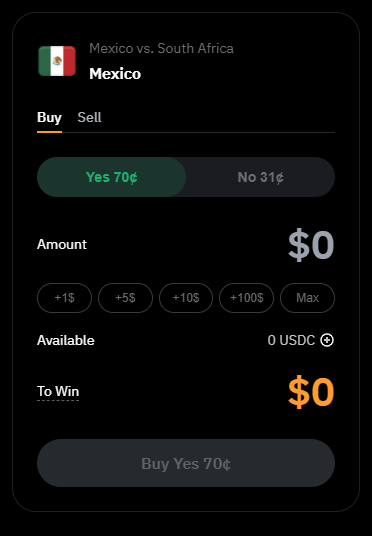
Step 3: Once you have selected your Prediction event, the order panel will be updated on the right side of the screen. Place your order by filling in the following information:
- Select the direction for your order: Buy or Sell.
- Click YES if you believe the selected outcome will occur, or NO if you believe it will not.
- Enter the amount of USDC you wish to invest.
Click on the Buy/Sell button to place your order.
Notes:
— Only USDC is supported on Prediction and the minimum order size is 5 USDC.
— Prediction will use funds from your Unified Trading Account. If you do not have enough funds, please click on the + icon next to your available balance to transfer or deposit more USDC.
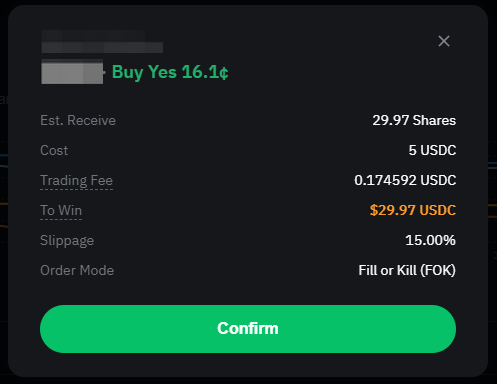
Step 4: Before submitting your order, review the information in the confirmation window and click on Confirm once done.
Notes:
— All orders are executed as market orders and processed immediately.
— If market prices change significantly while you are placing your order and the estimated entry price deviates by more than 5%, your order will be automatically rejected, and no funds will be deducted from your account. This helps protect you from unfavorable fills. If this occurs, you may submit a new order using the updated market price.
How to Manage your Position on Bybit Prediction
Click on Portfolio in the left side menu to view your active prediction market positions. For each position, you can track:
- Shares: The number of shares you have purchased.
- Avg. price: The average entry price of the position.
- Current Price: The current market price applicable to the position.
- Cost: The total value of the position when it was opened.
- Max payout: The amount you would receive if your prediction is correct.
- Value: The current value of the position, calculated using the current price. Your unrealized P&L will also be visible below each value amount.
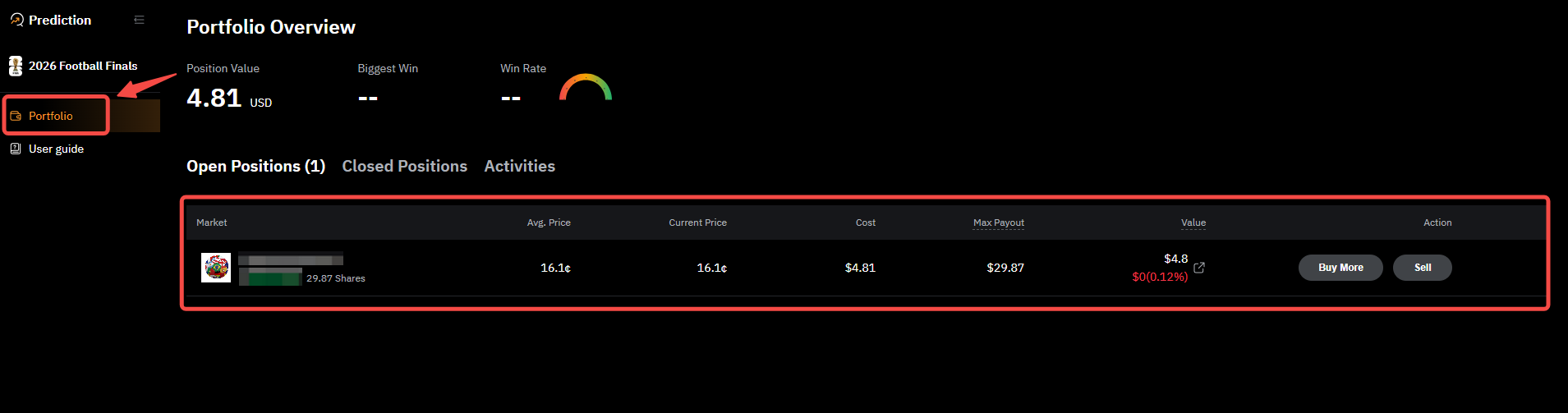
You can also click on Buy More to increase your number of shares for this specific position or click on Sell to reduce or close your position.
In the Activities tab, you will be able to see your Prediction orders history.
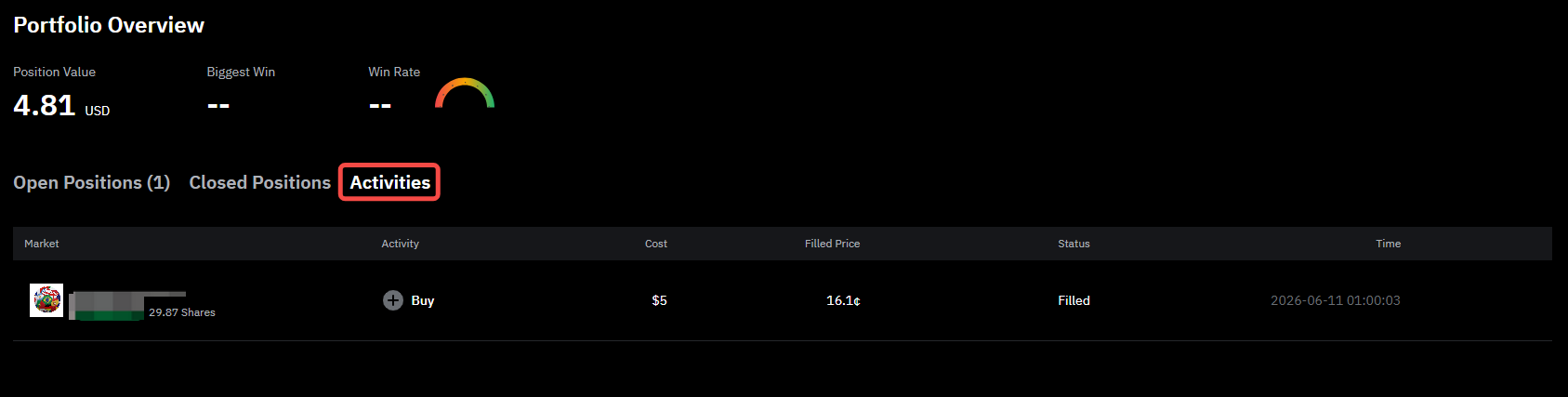
Once the event has concluded, winning positions are automatically settled, and the corresponding USDC payout is credited to your account. You can view the transaction in your Asset History.