Creating a TradFi Combo Bot involves setting key parameters that define your trading strategy. This guide walks you through each parameter and explains how they work when setting up your bot.
Bot Creation Page
When creating a TradFi Combo Bot, you can choose from three modes: AI Strategy, Manual, or Grid.
AI Strategy
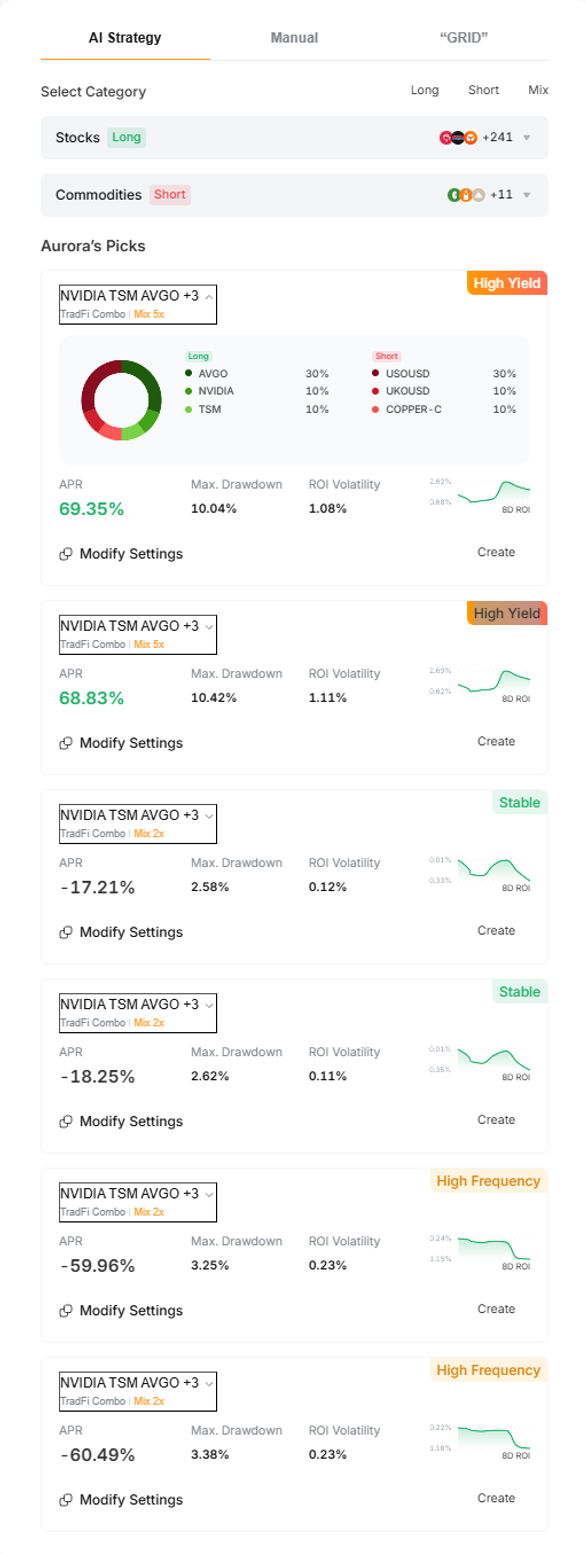
In the AI Strategy mode, you'll find six pre-built strategies under Aurora's Picks, generated by AI using historical data and expected market trends. You can choose from high-yield, stable, or high-frequency strategies based on your trading style and deploy your combo with a few clicks. This makes it easier for beginners to get started.
Manual
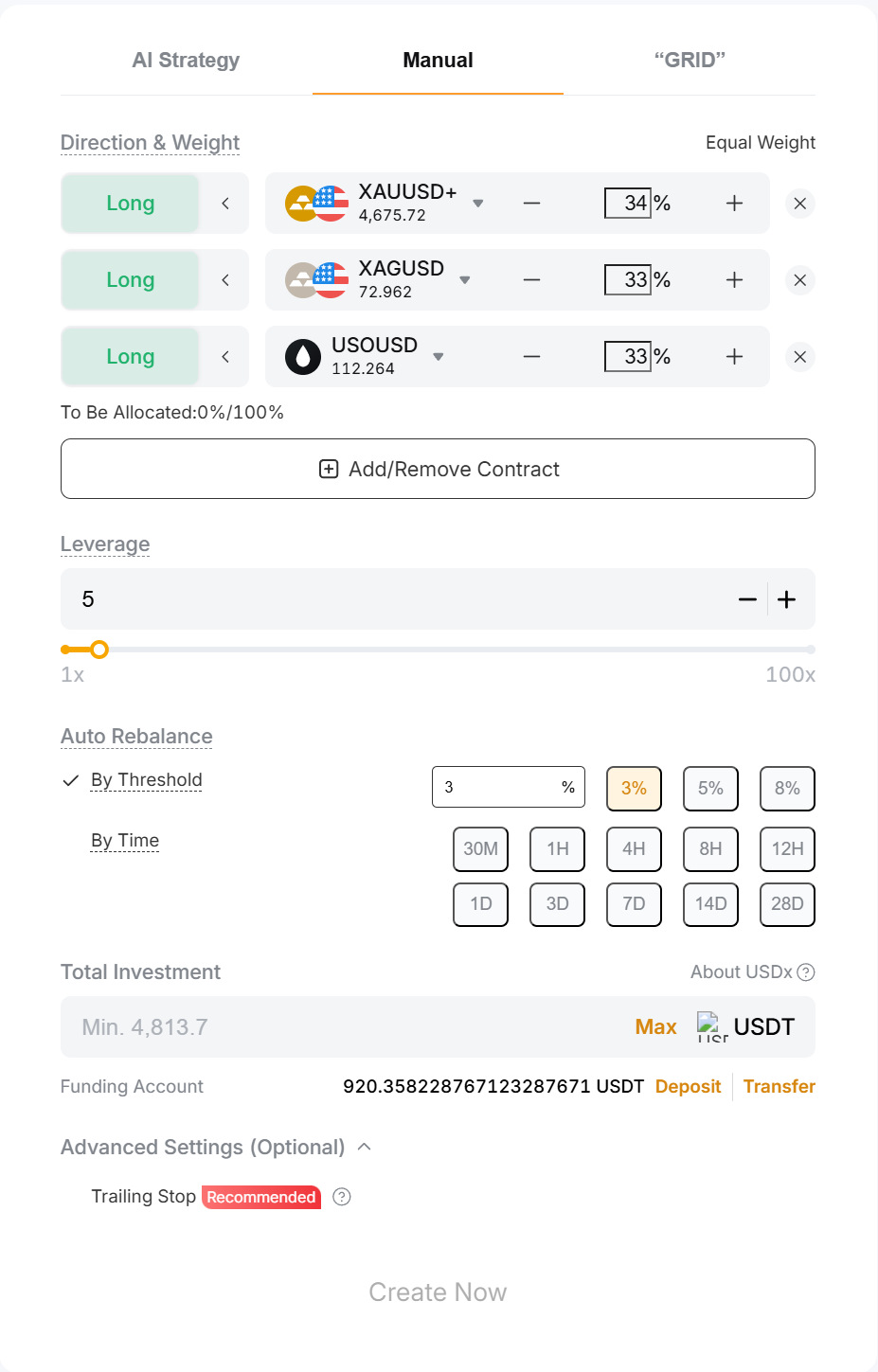
In the Manual mode, you can customize all parameters for maximum flexibility and precise control over your strategy. Refer to the parameter explanations below to configure your bot.
Parameter | Explanation |
Direction & Weight | Long/Short: Determines the position direction.
Contracts: Sets the contracts to include in your portfolio.
Weight: Defines the allocation of each contract within the portfolio, with the total adding up to 100%. You can also use the Equal Weight button to allocate evenly. |
To Be Allocated | Shows the percentage of your portfolio that has not yet been allocated. To create a TradFi Combo Bot successfully, the total allocation must reach 100%. |
Leverage | You can select leverage from 1× up to the lowest maximum leverage among all selected contracts, with an overall cap of 100×. This means that even if the lowest maximum leverage among your selected contracts exceeds 100× (e.g., 120×), the maximum leverage you can set is still limited to 100×.
maxLv = min(max(Lv₁), max(Lv₂), …, max(Lvₙ))
Example If your TradFi Combo Bot includes XAUUSD+, XAGUSD, and TSLA with maximum leverages of 500×, 100×, and 5×, respectively, the maximum leverage that can be set for the bot is 5×. Note: The values in this example are for illustration only. Please refer to the order placement page for the actual leverage. |
Auto Rebalance | Automatically rebalances positions based on either a proportion threshold or a fixed time interval.
For example, if you set the proportions of XAUT:TSLA:GAS to 5:3:2 and the relative values change to 6:3:1, the system will place orders to restore the original 5:3:2 allocation. |
Total Investment | The amount you wish to invest in the bot. The system will calculate the minimum required investment based on your selected parameters. |
Trailing Stop (Optional) | The Trailing Stop feature automatically adjusts your exit level based on your account's highest recorded equity.
For example, if your equity fluctuates between 500, 450, 600, 900, 800, 1,000, and 800 at different points throughout the week, and you set a 20% retracement rate, your exit equity will be 400, 400, 480, 720, 720, 800, and 800, respectively.
When your account equity drops to 800 (matching the exit equity), the Trailing Stop will be triggered, closing all positions and terminating the bot at the market price. Please note that due to slippage, your final account equity may differ from the exit equity. |
Note: Ensure you have sufficient funds in your Funding Account to create a bot.
Grid
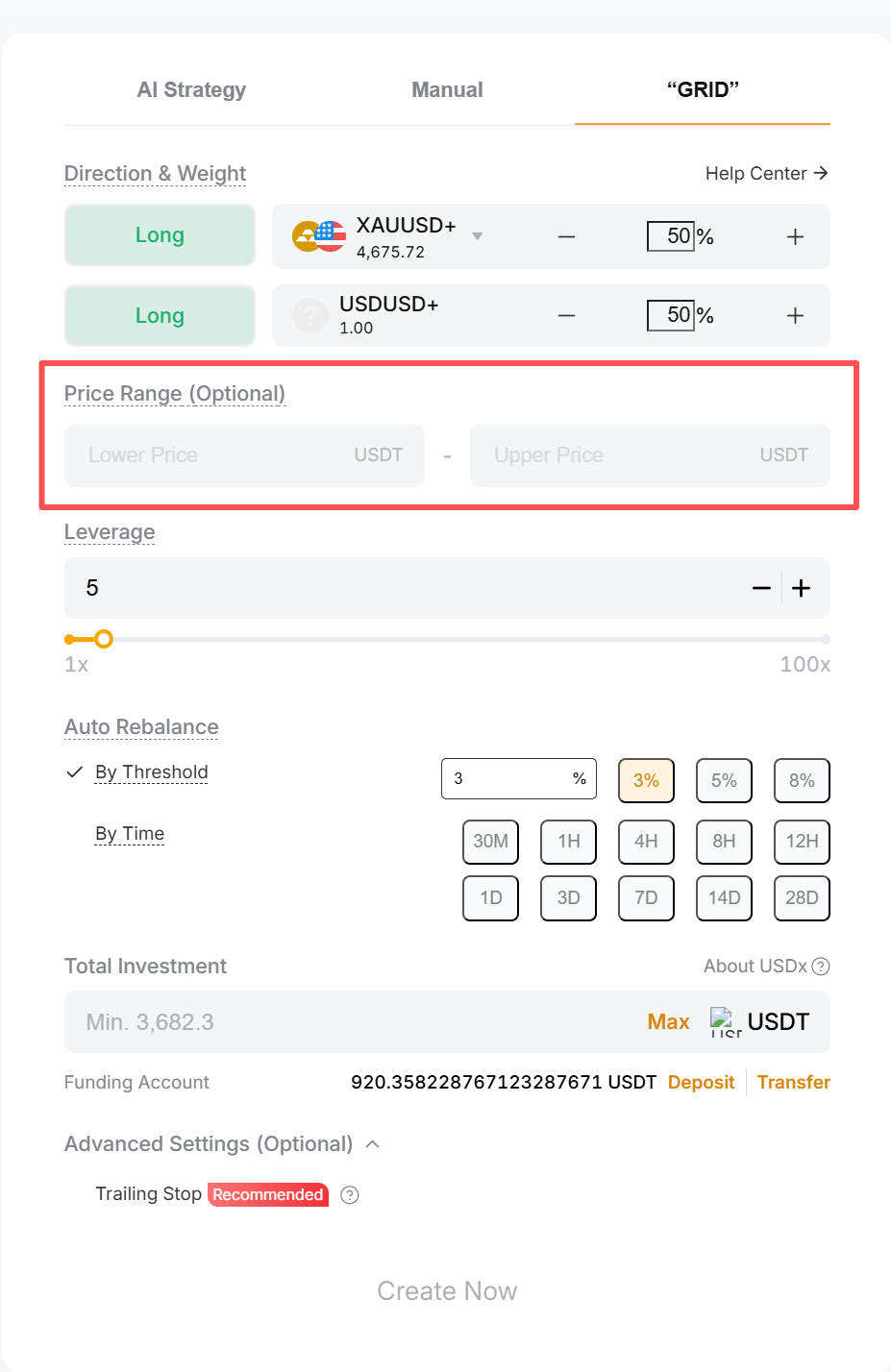
In the Grid mode, the system follows a structured rebalancing strategy designed to simulate a grid strategy. All parameters are the same as in Manual mode, with the addition of a defined price range.
When the price stays within this range, the system automatically rebalances your portfolio by selling assets that have increased in value and buying those that have declined. This helps maintain your target allocation while applying a disciplined buy-low, sell-high strategy.
If the price moves outside the defined range, rebalancing will stop, and asset weights will be determined solely by market movements.
Example
The following example illustrates how "Grid" mode works. For simplicity, prices move in $50 increments.
- Investment amount: $100,000
- Initial XAUT price: $1,000
- Price range: $800 to $1,300
- Price step: $50
- Allocation: XAUUSD+ (Long, 50%), USDUSD+ (Long, 50%)
- Rebalancing condition: 5% deviation (by threshold)
XAUT price ($) | XAUT value ($) | USD value ($) | Total value ($) | Weight (XAUT) | Rebalance? | Adjustment amount | XAUT qty. before adjustment | XAUT qty. after adjustment | USD value after adjustment |
1,000 | 50,000 | 50,000 | 100,000 | 50.00% | — | — | 50 | 50 | 50,000 |
1,050 | 52,500 | 50,000 | 102,500 | 51.22% | No | — | 50 | 50 | 50,000 |
1,100 | 55,000 | 50,000 | 105,000 | 52.38% | No | — | 50 | 50 | 50,000 |
1,150 | 57,500 | 50,000 | 107,500 | 53.49% | No | — | 50 | 50 | 50,000 |
1,200 | 60,000 | 50,000 | 110,000 | 54.55% | No | — | 50 | 50 | 50,000 |
1,250 | 62,500 | 50,000 | 112,500 | 55.56% | Yes | $6,250 Sell 5 XAUT | 50 | 45 | 56,250 |
1,200 | 54,000 | 56,250 | 110,250 | 48.97% | No | — | 45 | 45 | 56,250 |
1,150 | 51,750 | 56,250 | 108,000 | 47.92% | No | — | 45 | 45 | 56,250 |
1,100 | 49,500 | 56,250 | 105,750 | 46.81% | No | — | 45 | 45 | 56,250 |
1,050 | 47,250 | 56,250 | 103,500 | 45.65% | No | — | 45 | 45 | 56,250 |
1,000 | 45,000 | 56,250 | 101,250 | 44.44% | Yes | $5,625 Buy 5.625 XAUT | 45 | 50.625 | 50,625 |
- As the XAUT price rises from $1,000 to $1,200, its weight remains below 55% (50% target + 5% threshold), so no rebalancing is triggered.
- When the price reaches $1,250, the XAUT weight increases to 55.56%, exceeding the threshold. The system triggers a rebalancing and sells XAUT to restore the 50:50 allocation.
- After rebalancing at $1,250:
- XAUT value = USD value = $112,500 ÷ 2 = $56,250
- Adjustment amount = $62,500 − $56,250 = $6,250
- XAUT sold = $6,250 ÷ 1,250 = 5 XAUT
- XAUT holdings after adjustment = 50 − 5 = 45 XAUT
- If the price continues to rise beyond the defined range (e.g., $1,500), no further rebalancing occurs, even if the allocation deviates further.
- As the price declines from $1,250 to $1,050, the XAUT weight remains above 45% (50% target − 5% threshold), so no rebalancing is triggered.
- When the price drops to $1,000, the XAUT weight falls to 44.44%, below the threshold. The system then triggers a rebalancing and buys XAUT.
- After rebalancing at $1,000:
- XAUT value = USD value = $101,250 ÷ 2 = $50,625
- Adjustment amount = $56,250 − $50,625 = $5,625
- XAUT bought = $5,625 ÷ 1,000 = 5.625 XAUT
- XAUT holdings after adjustment = 45 + 5.625 = 50.625 XAUT
Note: The example above is for illustrative purposes only and may not reflect actual market conditions. It does not take margin requirements or other factors into account.
Bot Details Page – Status Tab
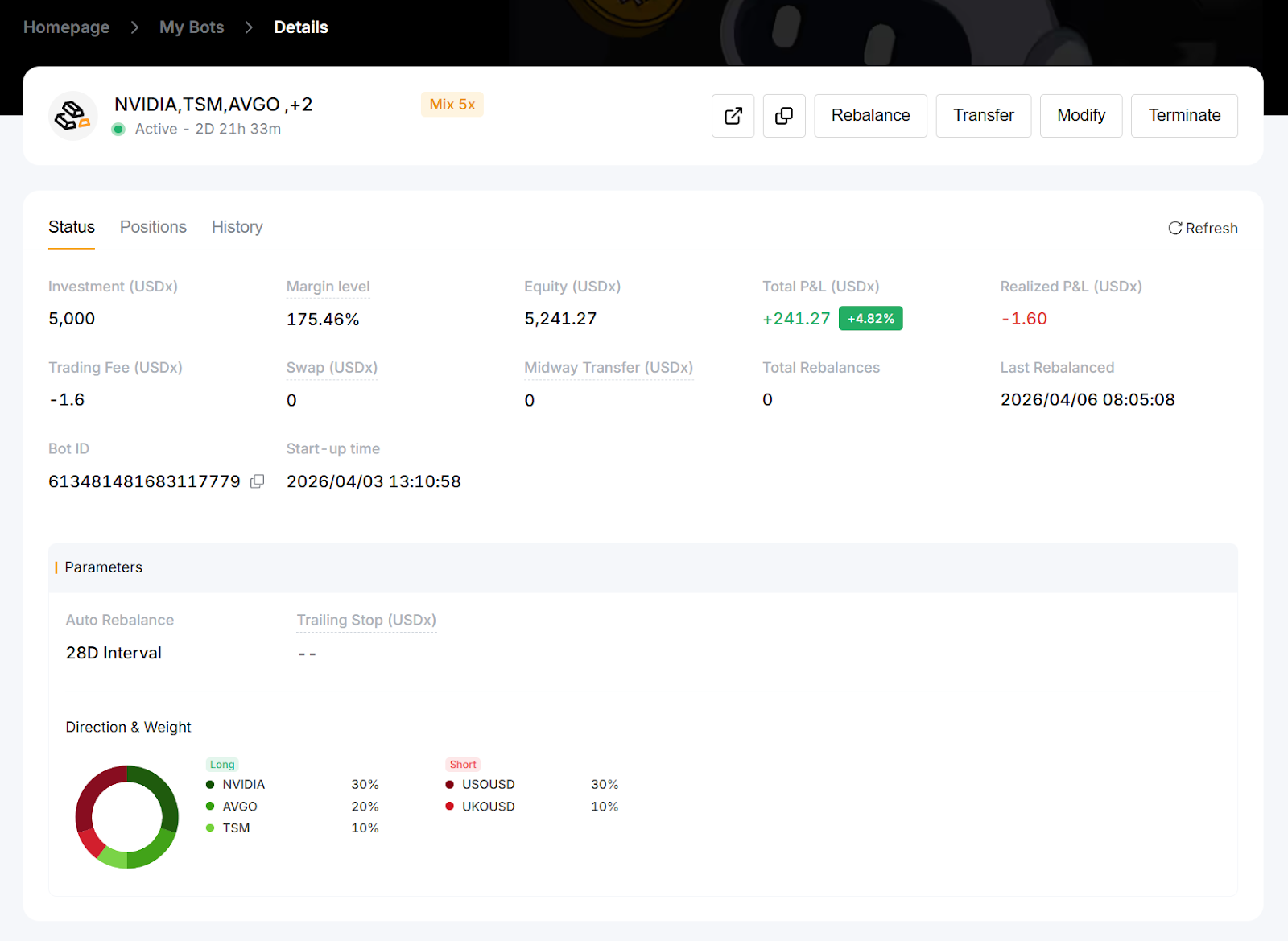
On the Status tab of the Details page, you can find key information about your TradFi Combo Bot, including the parameters you have configured. Below are additional important details available on this page:
Parameter | Explanation |
Margin Level | Indicates how much of your available funds are being used as margin and reflects your account's risk level. A higher margin level (typically above 100%) means you have more free margin and a healthier account. A lower margin level indicates higher risk and may lead to a margin call or stop-out if the market moves against your positions.
Margin level = Equity ÷ Margin × 100%
If your margin level falls to the 50% stop-out level, a margin closeout will be triggered. Your TradFi Combo Bot will be automatically terminated, and all positions will be closed at the market price. |
Equity (USDx) | The current value of the assets held in the bot, including unrealized P&L. |
Total P&L (USDx) | Total P&L is the sum of unrealized P&L and realized P&L. - Realized P&L: The profit or loss from closed positions after deducting trading fees.
- Unrealized P&L: Based on the difference between the average holding cost and the current market price.
|
Trading Fee (USDx) | The trading fee incurred by your bot. The fee structure is the same as for Bybit TradFi trading. For more details, refer to TradFi: Fees Explained. |
Swap (USDx) | Overnight financing charges apply to positions held after the daily settlement. |
Midway Transfer (USDx) | The total amount you've transferred to the bot so far. Note: If any contract in the bot is suspended due to market closure, added funds will not trigger rebalancing and will be used as margin only. |
Total Rebalances | The total number of times the bot has automatically rebalanced positions. |
Last Rebalanced | The most recent time the bot performed an automatic rebalancing. |
Note: USDx is an internal display unit that reflects the representative value of your USDT holdings in your TradFi account at a 1:1 ratio. This value is recorded in the platform ledger. USDx is not legal tender. For more details, refer to this announcement.
Bot Details Page – Positions Tab
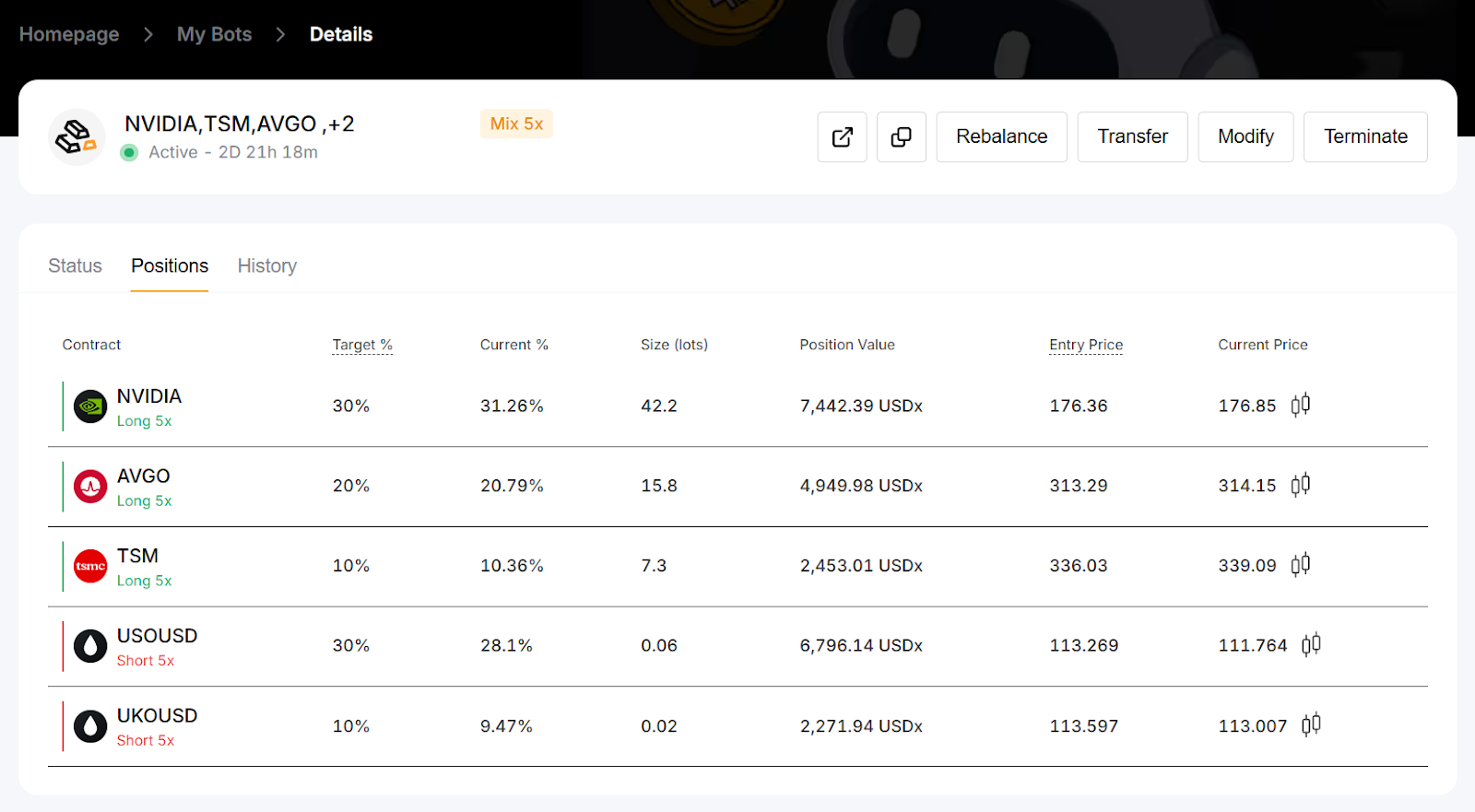
The Positions tab on the Details page displays all open positions for each contract in your TradFi Combo Bot.
Bot Details Page – History Tab
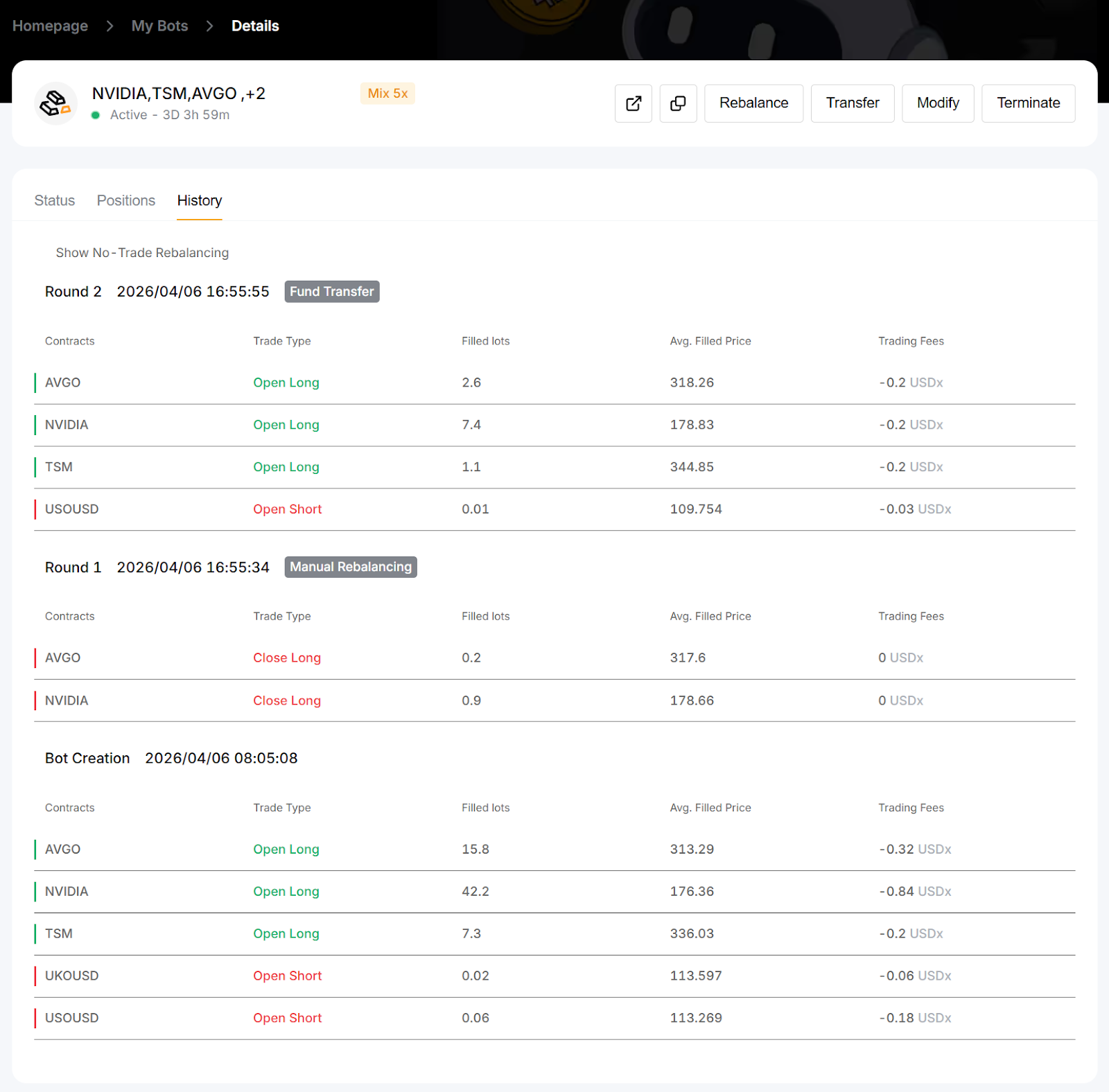
The History tab on the Details page provides information on past activity, including bot creation, termination, and each rebalancing round.